
Vaillant heat pump in TapHome: temperatures, setpoints and energy over eBUS
Read and set a Vaillant heat pump with the sensoCOMFORT VRC 720 from TapHome: temperatures, room and hot water setpoints, modes, hot water boost, energy and errors, through the eBUS Adapter C6 with micro-ebusd. A beta template is in the TapHome portal.

Why and how you would use it
Vaillant heat pumps and boilers are in many houses where TapHome controls the rooms. The heat pump has its own controller, usually the sensoCOMFORT VRC 720, and its own app. TapHome then does not know the outdoor temperature the heat pump sees, the hot water temperature or how much electricity the heat pump uses, and it cannot lower the room setpoint when nobody is at home.
A typical case: a house with an aroTHERM plus heat pump and photovoltaics. The owner wants TapHome to heat the hot water when the panels produce surplus power, to see the heat pump consumption next to the other meters, and to set a lower temperature during a holiday, without opening the Vaillant app.
Vaillant devices talk to each other over eBUS, a two-wire bus between the controller, the heat pump and the boiler. The eBUS Adapter C6 connects to this bus and, with its micro-ebusd function, offers the values over a local HTTP interface. A community template for this path is now in the TapHome portal as a beta.
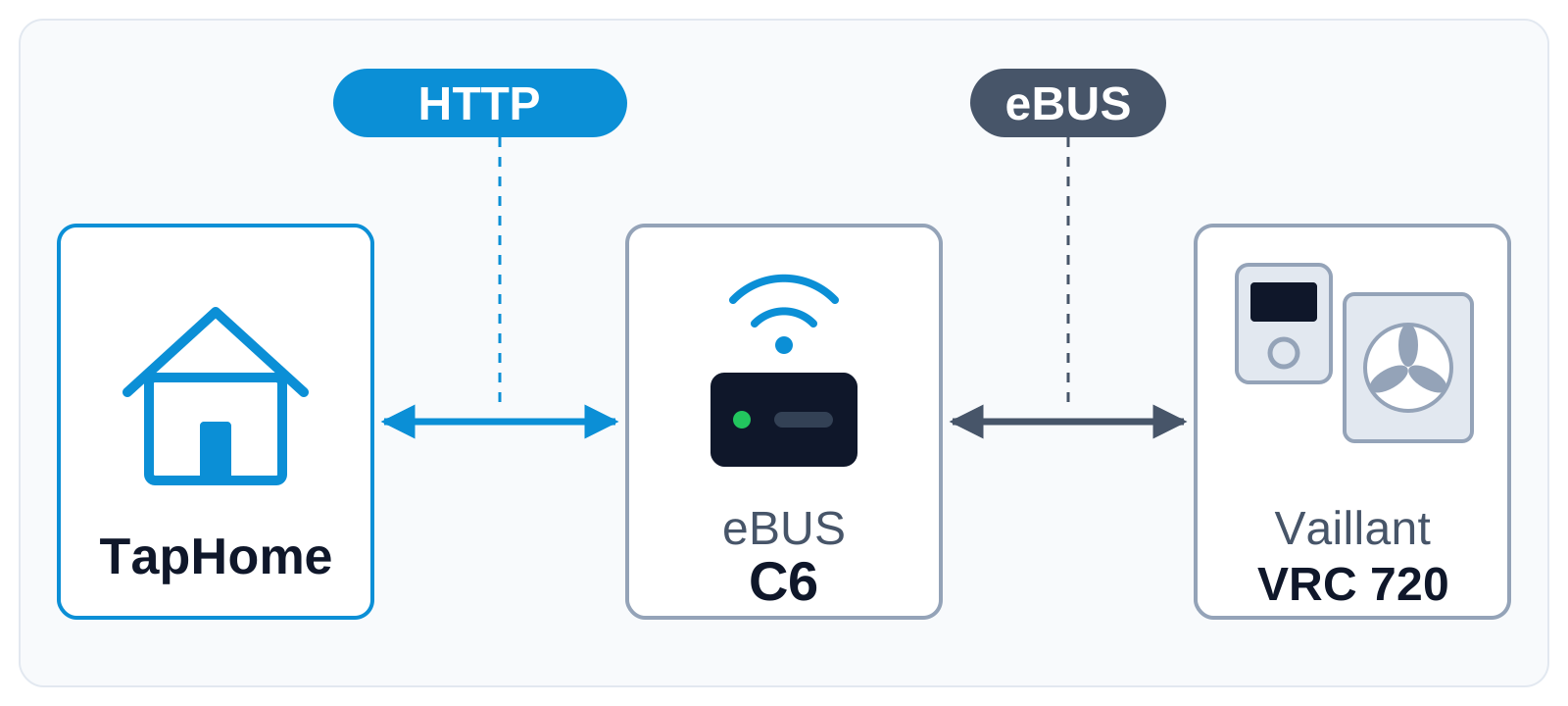
TapHome asks the adapter for each value about once a minute and writes setpoints back. The adapter reads and writes them on eBUS, so the Vaillant controller stays in charge of the heat pump.
| Today | With this idea | |
|---|---|---|
| Heat pump values | Vaillant app only | Also in TapHome |
| Room and hot water setpoint | Vaillant controller | Also from TapHome |
| Template | Beta, being tested | Tested, verified |
What will be possible
The community template works without a change to TapHome itself. It was tested with a simulated adapter on a TapHome Core, not yet with a real adapter and a real Vaillant system, so each point below is still to be confirmed in a real installation.
- Temperatures. Outdoor temperature, room temperature of zone 1, flow temperature and hot water tank temperature as TapHome devices for smart rules and charts.
- Room setpoint. The setpoint of zone 1 can be changed from TapHome as a temporary override of the time programme.
- Modes. Operating mode of zone 1 and of the hot water: off, auto, manual or day, night.
- Hot water. Hot water setpoint and a one-time hot water boost, for example when the photovoltaics produce surplus power.
- Energy and errors. Electrical power and energy of the heat pump as a TapHome electricity meter, the coefficient of performance and the state of the heat pump, and an error in TapHome when the controller reports a fault.
- Nothing written on restart. When the TapHome Core starts, the template takes the values from the adapter and writes nothing.
What will not be possible
- A connection without an adapter. TapHome needs the eBUS Adapter C6 with micro-ebusd, a paid function of the adapter unlocked with a token.
- The Vaillant cloud. The template uses only the local network; the myVAILLANT app and its cloud are not used.
- Installer settings. The heat curve, the maximum flow temperature and other installer parameters are left out on purpose, so a wrong value cannot harm the heating.
- Every Vaillant system without checking. The names on eBUS differ between controllers and versions; some VRC 720 versions accept a written setpoint without applying it, and TapHome then shows the value the controller really uses.
How to solve it today
- The beta template for Vaillant. Connect the eBUS Adapter C6 to the eBUS of the Vaillant controller, turn on micro-ebusd on the adapter and import the Vaillant template from the TapHome portal (the card above). The compatibility page shows each step.
- The adapter itself. The eBUS Adapter Shield C6 Stick template shows the health of the adapter in TapHome.
- Without a data connection. A relay of TapHome on the heat demand input or the SG Ready inputs of the heat pump switches heating by rules, as described under Vaillant in the documentation.
Learn more
- EMS-ESP heat pump, the same kind of gateway for Bosch, Buderus and IVT heat pumps.
- Heating and cooling in the TapHome documentation.
Which Vaillant heat pump and controller do you have, and what would you like TapHome to do with it? Try the beta template and tell us in the comments how it works, vote for this idea and follow it for updates.
Requirements
- A connection to the device: eBUS, HTTP
Related
Status history
- Nov 5, 2026 Beta Published
Comments 0
Sign in with your TapHome account to comment. The team approves comments before they appear.
No comments yet.
·
The original comment was deleted.
Ideas describe direction, not commitments. We do not publish dates; released features are announced in the release notes.
Sign in with your TapHome account to follow. We email you when something changes; unsubscribe in one click.
Confirming your vote…