
Two-factor sign-in: a code or a passkey when a new phone signs in to a TapHome account
Signing in to a TapHome account needs only an e-mail and a password today. A second step, a code from an authenticator app or a passkey, would stop a leaked password from opening your locations, and the Admin of a location could require it for Admin and Service.
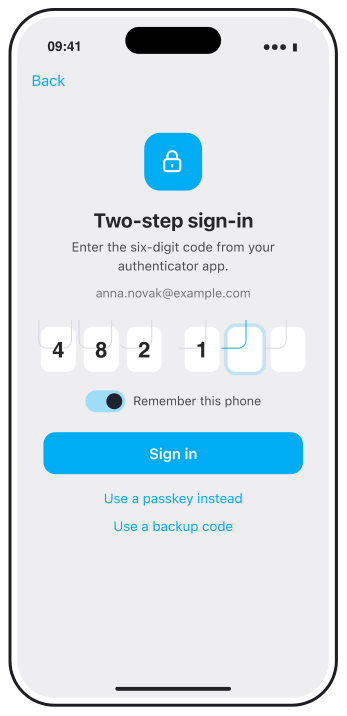
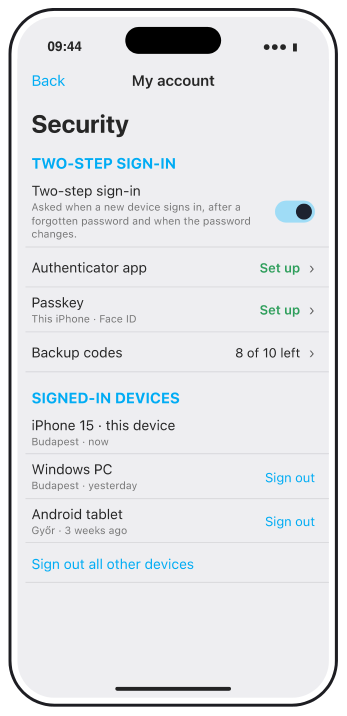
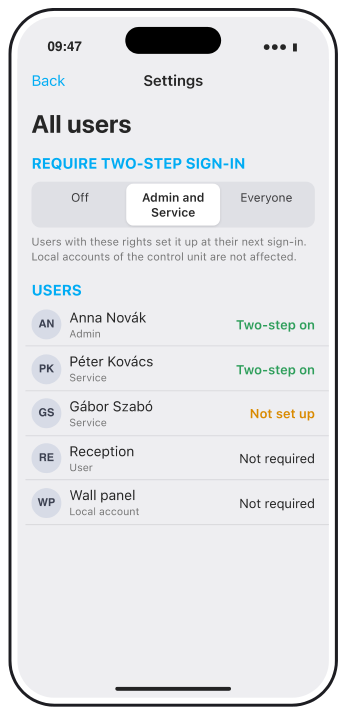
A draft: after the password, a new phone asks for a code from an authenticator app or for a passkey, the account shows its signed-in devices, and the Admin of a location can require the second step. The details may still change.
Why and how you would use it
A TapHome account opens every location it has rights to, from anywhere through the TapHome cloud. Today signing in needs only an e-mail and a password. When that password leaks or is reused from another service, someone else can sign in on their own phone. For an installer with Service rights on dozens of houses, hotels and offices, one password protects all of them.
| Today | With this idea | |
|---|---|---|
| Sign-in on a new phone | E-mail and password | Password and a code |
| A leaked password | Enough to sign in | Not enough |
| Who must use it | Nobody | The Admin decides |
What will be possible
We are evaluating this idea. Nothing below is scheduled yet.
- A second step at sign-in. After the password, the app asks for a six-digit code from an authenticator app such as Google Authenticator, Microsoft Authenticator or 1Password, or for a passkey confirmed with Face ID, Touch ID or Windows Hello.
- Once per device, not every day. The second step is asked when a phone, tablet or computer signs in for the first time, after a forgotten password and when you change the password or e-mail. Opening the app on a signed-in phone stays as it is.
- Required by the Admin of a location. The Admin can require the second step for everyone with Admin or Service rights, or for all users. All users shows who has it set up, and whoever does not is guided through the setup at the next sign-in.
- Backup codes. Ten one-time codes for a lost or replaced phone.
- Signed-in devices. The account lists the phones, tablets and computers that are signed in, and signs out one of them or all at once. Changing the password signs out the others.
- A notice about a new sign-in. An e-mail when the account signs in on a new device, with a way to sign out all devices if it was not you.
- The house keeps working without internet. The second step is checked by the TapHome cloud at sign-in. Phones that are already signed in keep controlling the house over the local network when the internet is down.
What will not be possible
- A code for every action. The second step protects signing in, not each tap. A garage door or gate that should ask first is a separate idea.
- Local accounts of the control unit. A local account signs in on the control unit itself and never through the cloud, so the second step does not apply to it. It also has no remote access.
- Integrations. TapHome API tokens, webhooks and linked services such as Alexa keep their own keys. Treat a token like a password and create a new one when it leaks.
- Codes by SMS. A first version would use an authenticator app and passkeys. Text messages can be redirected to another SIM card.
- Signing in a new phone without internet. The first sign-in of a new device needs the TapHome cloud, as today.
How to solve it today
- Use a unique password for your TapHome account. Do not share it with colleagues and do not reuse it from another service. Every person gets their own account with the rights they need. See Users and permissions.
- Turn off remote access where it is not needed. In All users, an account can be limited to the local network with Enable remote access. See Settings.
- Change the password of the local admin account of the control unit, and use a local account for shared wall panels and tablets. See Users and permissions.
- Lock the app on iPhone and iPad. Require user authentication asks for Face ID, Touch ID or the device passcode when the app opens. See Application settings.
- Keep the control unit on its own network, not on a guest Wi-Fi. See Network architecture.
Learn more
- Confirm before action is the idea for asking before a garage door or gate opens.
- Users and permissions explains the TapHome account, the local account and the Admin, Service and User rights.
Who should have to use a second step on your locations? Vote, follow this idea and answer the poll below.
Requirements
- TapHome app; new features arrive first in TapHome Next
Related
Status history
- Nov 13, 2026 Gathering interest Published
Comments 0
Sign in with your TapHome account to comment. The team approves comments before they appear.
No comments yet.
·
The original comment was deleted.
Ideas describe direction, not commitments. We do not publish dates; released features are announced in the release notes.
Sign in with your TapHome account to follow. We email you when something changes; unsubscribe in one click.
Want to know when this moves forward?
Follow this idea to get an email when its status changes. Unsubscribe in one click.
Sign in with your TapHome account to follow. We email you when something changes; unsubscribe in one click.
Confirming your vote…