
Sonoff SNZB-02LD in TapHome: a Zigbee temperature probe as a wireless floor sensor
Read the waterproof Sonoff SNZB-02LD Zigbee temperature probe in TapHome through a gateway with Tasmota firmware, for example as a wireless floor sensor for underfloor heating, with the battery level and an offline warning. A beta template is in the TapHome portal.

Why and how you would use it
Underfloor heating works best when TapHome knows the temperature under the floor as well as in the room. In a new building, a wired floor sensor goes under the floor before it is covered. In an existing house that is often too late: the floor is finished, and no cable leads from the floor to a TapHome module.
A typical case: a house with underfloor heating where only the room temperature is measured. The heating follows the room sensor alone, and nobody sees how warm the floor gets. A battery-powered probe would add the floor temperature without a new cable to the electrical panel: the probe goes where the temperature is measured, and the sensor body stays outside, on the wall next to it.
The Sonoff SNZB-02LD is such a probe. It is a waterproof Zigbee 3.0 thermometer with an external probe on a 1.5 m cable, a range from −40 °C to 115 °C and a display on the sensor body. It runs on a CR2477 coin cell and measures temperature only. TapHome already reads Zigbee sensors through a gateway with Tasmota firmware, which passes their values to TapHome over MQTT. A community template for the SNZB-02LD is now in the TapHome portal as a beta.
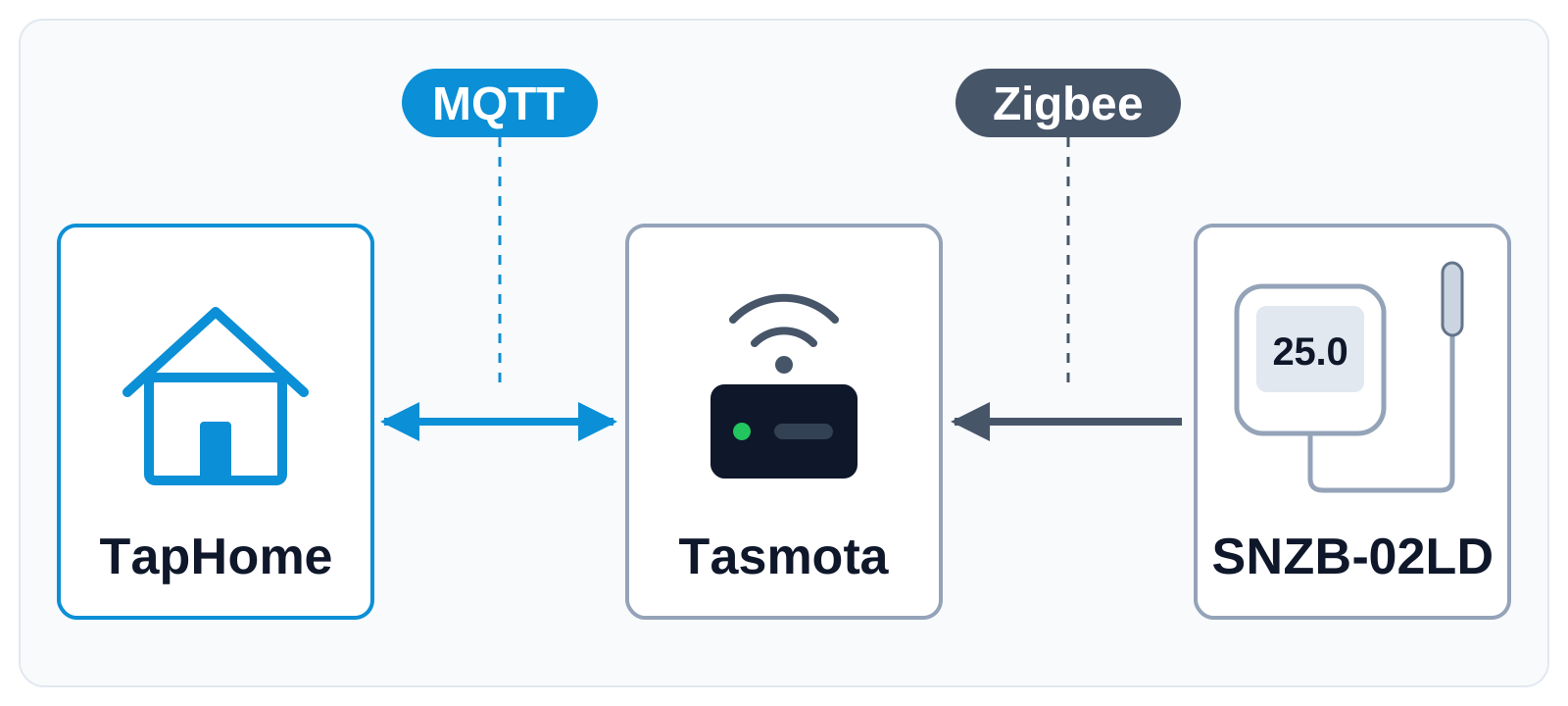
The probe sends each new value over Zigbee to the gateway, and the gateway publishes it to an MQTT broker, for example the one built into the TapHome Core. TapHome reads the value from there and once an hour asks the gateway for the battery level and the time of the last report.
| Today | With this idea | |
|---|---|---|
| Floor temperature | Wired sensor only | Wireless probe too |
| SNZB-02LD template | Beta, being tested | Tested, on compatibility list |
| Empty battery | Not visible | Warning in TapHome |
What will be possible
A community template for the SNZB-02LD through a Zigbee2Tasmota gateway is in the TapHome portal as a beta, without a change to TapHome itself. It was tested with a simulated gateway, not yet with a real sensor, so each point below is still to be confirmed in a real installation.
- Probe temperature as a TapHome device. The temperature from the probe is a TapHome device that you can use in smart rules, charts and notifications. After a restart of the Core, the device takes the last known value from the gateway, so it does not stay empty until the next report.
- Floor sensor for underfloor heating. The temperature can serve as the floor temperature in the cascade PID control of underfloor heating, which uses it to limit the floor temperature.
- Battery and signal. Battery level, battery voltage and Zigbee link quality are service attributes, with a warning when the battery drops below 30 %.
- Offline warning. A warning when the gateway has not heard from the sensor for 12 hours and an error after 24 hours, for example because its battery is empty or it is out of range of the gateway.
What will not be possible
- Humidity. The SNZB-02LD measures only temperature.
- A connection without a Zigbee gateway. TapHome reaches Zigbee sensors through a gateway that passes their values over MQTT. The template needs a Zigbee2Tasmota gateway, for example a Sonoff ZBBridge Pro or an eWeLink ZB-GW03 with Tasmota firmware.
- Values within seconds. According to the manufacturer, the sensor reports right away when the temperature changes by more than a set threshold, and otherwise at least once an hour. Floor temperature changes slowly, but where a value must arrive within seconds, a wired sensor is the better choice.
- Sensor settings from TapHome. The template reads the sensor, it does not configure it, so the calibration offset and the reporting threshold are not set from TapHome. The existing Zigbee2Tasmota templates do not offer calibration either.
How to solve it today
- The beta template for the SNZB-02LD. Import the SNZB-02LD template from the TapHome portal and enter the address of the MQTT broker, the MQTT topic of the gateway and the short address of the sensor, which the gateway shows in its console after pairing. Keep the Tasmota option SetOption83 at 0, its default.
- A wired floor sensor. The TapHome NTC floor temperature sensor connects to a universal input of a TapHome module. In electrical underfloor heating, it goes under the floor before the floor is covered, at least 1 m from the wall, see Requirements.
- Zigbee temperature sensors with a template. Through the same gateway, the Aqara Temperature, Humidity and Pressure Sensor measures the air around it, without a probe. Through Zigbee2MQTT, the Tuya TS0201 measures room temperature and humidity.
Learn more
- Zigbee2Tasmota Gateway on the TapHome compatibility list, with the supported gateways and the pairing of Zigbee devices.
- Cascade PID control of underfloor heating in the TapHome documentation.
- MQTT Broker built into the TapHome Core.
Which Zigbee gateway do you use, and where would you place the probe? Try the beta template and tell us in the comments how it works, vote for this idea, follow it for updates and answer the poll below.
Requirements
- A connection to the device: Zigbee, MQTT
Which Zigbee gateway would you connect the SNZB-02LD through?
Related
Status history
- Nov 1, 2026 Beta Published
Comments 0
Sign in with your TapHome account to comment. The team approves comments before they appear.
No comments yet.
·
The original comment was deleted.
Ideas describe direction, not commitments. We do not publish dates; released features are announced in the release notes.
Sign in with your TapHome account to follow. We email you when something changes; unsubscribe in one click.
Confirming your vote…