
Somfy TaHoma in TapHome: io and RTS blinds through the local gateway API
Control Somfy io roller shutters, awnings and exterior venetian blinds and send commands to RTS motors from TapHome through the local Developer Mode API of a TaHoma gateway. A beta template is in the TapHome portal.

Why and how you would use it
Somfy motors are in many houses: roller shutters, exterior venetian blinds, awnings and curtains. When they have a radio receiver, they are usually paired with a Somfy TaHoma gateway and controlled from the TaHoma by Somfy app. Then the same blinds live in two apps, and TapHome cannot move them with the rest of the house, for example closing the shutters at sunset or raising the blinds before a storm.
A typical case: a house with TapHome where the previous owner fitted Somfy io roller shutters with a TaHoma Switch. Replacing working motors with wired ones only to control them from TapHome is costly, and pulling new cables behind finished walls is often not possible.
Since Somfy opened a local interface on the TaHoma gateway, called Developer Mode, the gateway can be controlled in the home network over HTTPS, without the Somfy cloud. A community template for TaHoma is now in the TapHome portal as a beta.
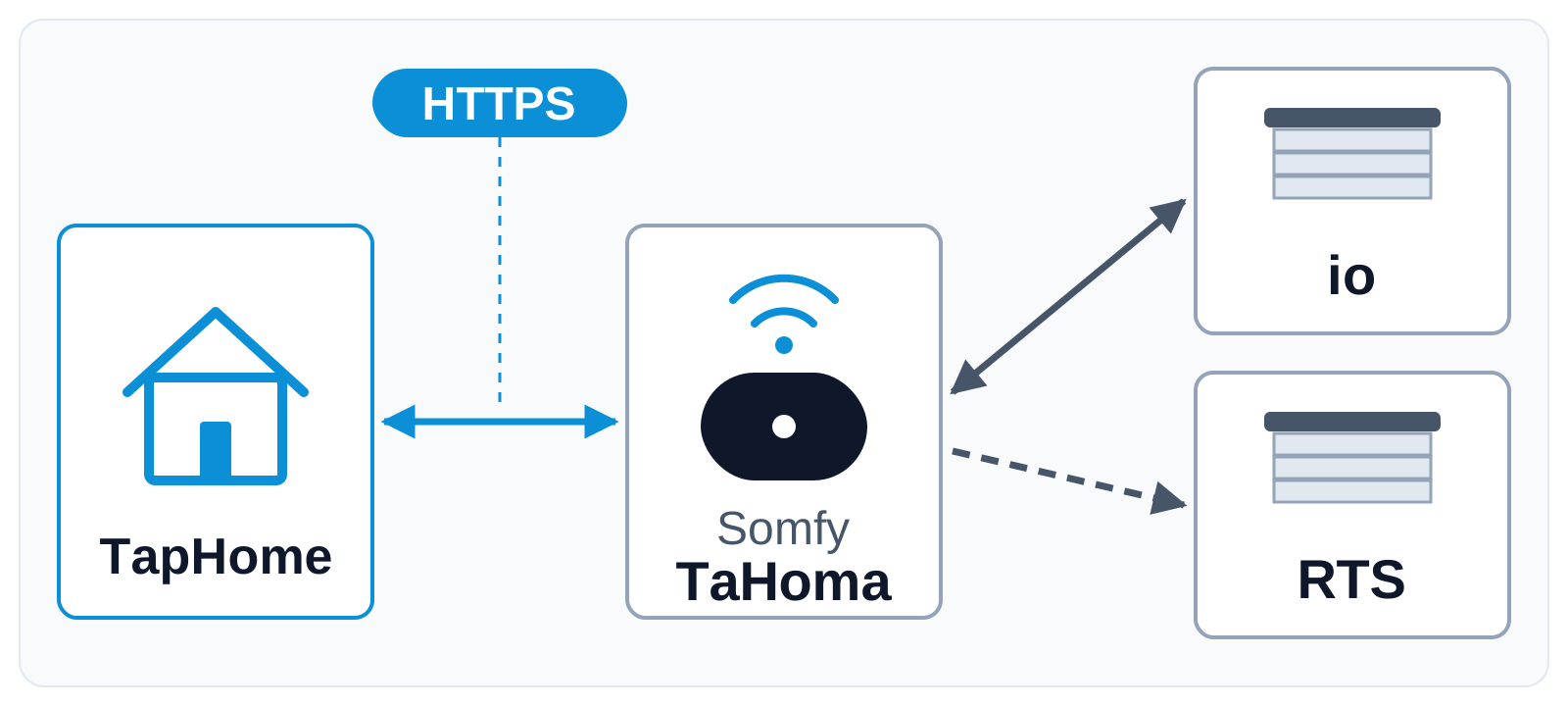
TapHome talks only to the gateway. The gateway passes each command to the motor over the Somfy radio: io-homecontrol motors confirm their position back, RTS motors only receive commands.
| Today | With this idea | |
|---|---|---|
| Wired Somfy motors | Relay modules | Relay modules |
| Somfy radio motors | TaHoma app only | TapHome too |
| TaHoma template | Beta, being tested | Tested, verified |
What will be possible
The community template works without a change to TapHome itself. It was tested with a simulated gateway on a TapHome Core, not yet with a real TaHoma gateway and real Somfy motors, so each point below is still to be confirmed in a real installation.
- io roller shutters and awnings by position. TapHome reads the position from the gateway every few seconds and moves the motor to any position, so the shutter works in smart rules, scenes and schedules like any other TapHome blind.
- io exterior venetian blinds with slats. Position and slat angle are set together in one command.
- RTS motors by command. Open, My (the favourite position stored in the motor), Stop and Close. The same command can be sent again, for example Close after the motor was moved with its own remote.
- No movement after a restart. When the TapHome Core starts, the blinds take their state from the gateway and no motor moves.
- Clear errors. A wrong token or an unreachable gateway shows as an error on the TapHome device.
What will not be possible
- RTS position. RTS is one-way radio: the motor does not report where it is, so TapHome shows the last command, not the position.
- First-generation gateways. Somfy does not offer Developer Mode on the first TaHoma box or Somfy box (square shape) and on the Connectivity Kit.
- Setup without the TaHoma app. Motors are paired with the gateway in the TaHoma by Somfy app, and Developer Mode with its token is turned on there too. TapHome only uses the gateway.
- Every Somfy device type. The template covers roller shutters, awnings and exterior venetian blinds. Some awnings report a different state than the template reads; the template page explains how to check it.
How to solve it today
- The beta template for Somfy TaHoma. Import the Somfy TaHoma template from the TapHome portal (the card above). Enter the address of the gateway, the Developer Mode token and the address of each motor, which the gateway lists in its device list. The Somfy TaHoma page on the compatibility list shows each step.
- Wired Somfy motors without radio. A 230 V Somfy motor without a radio receiver is controlled by TapHome directly with relay modules, like any other blind motor, with no gateway, see Requirements.
Learn more
- Blinds, slides and awnings in the TapHome documentation.
- Packet Parser, the scripting interface the template uses.
Which Somfy motors do you have, and which TaHoma gateway? Try the beta template and tell us in the comments how it works, vote for this idea and follow it for updates.
Requirements
- A connection to the device: HTTPS, io-homecontrol, RTS
Related
Status history
- Nov 4, 2026 Beta Published
Comments 0
Sign in with your TapHome account to comment. The team approves comments before they appear.
No comments yet.
·
The original comment was deleted.
Ideas describe direction, not commitments. We do not publish dates; released features are announced in the release notes.
Sign in with your TapHome account to follow. We email you when something changes; unsubscribe in one click.
Confirming your vote…