
Send script data out of TapHome: a text variable and HTTP from smart rules
An integration that computes hundreds of values in smart rule scripts cannot send them to an external service in one request today. A text variable, shared collections or HTTP requests from smart rule scripts would let any script build one JSON and send it.
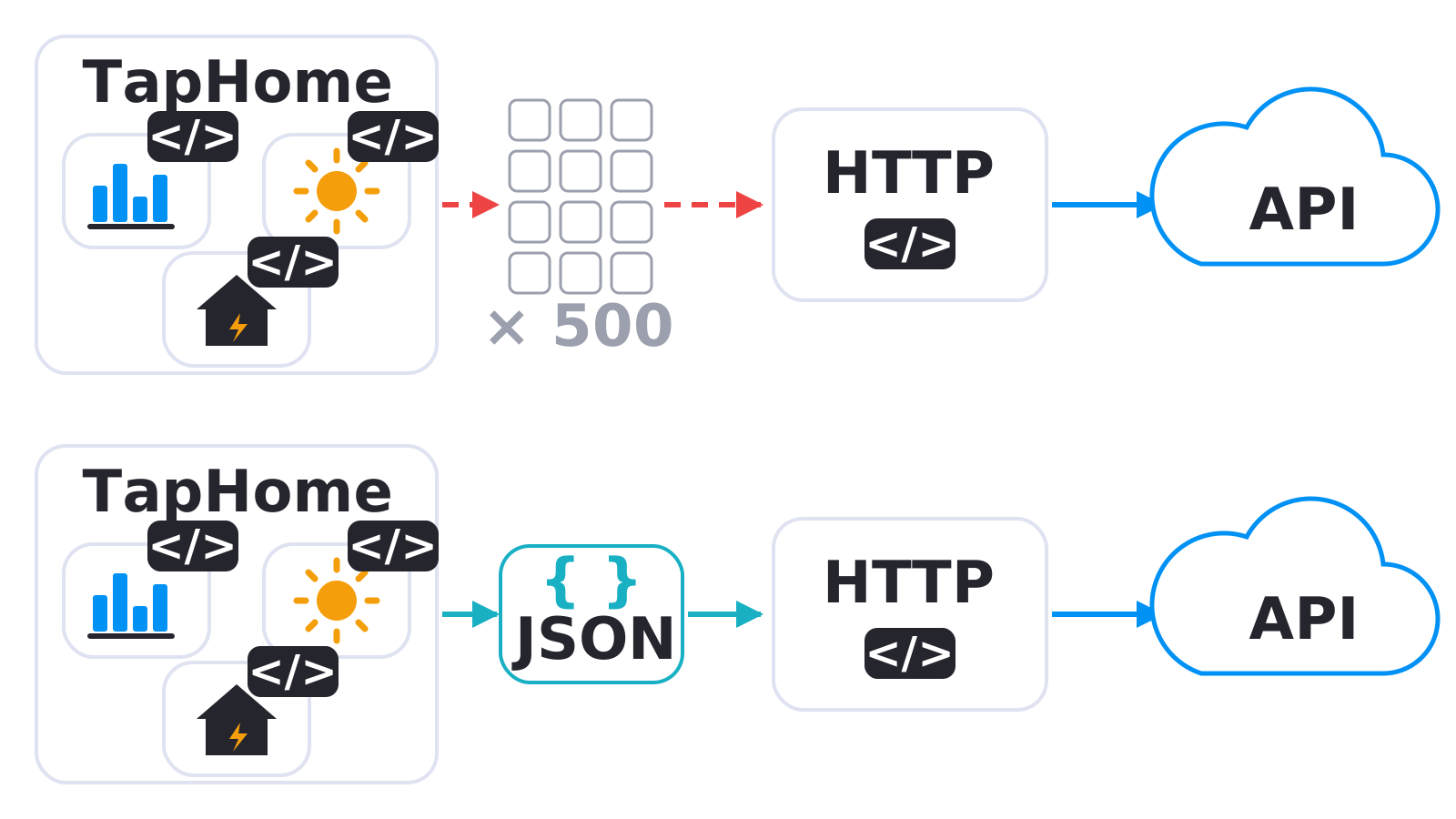
Today, values computed in several scripts reach the module that sends HTTP requests only through hundreds of helper devices. With this idea, the scripts would share one value, for example a whole JSON document, and the module would send it in one request.
Why and how you would use it
More and more installations work with an external service: energy management over the spot market, a company backend, a reporting tool. Such a service usually expects one request with a lot of data. TapHome can calculate that data, but it cannot easily put it together and send it out:
- A Script smart rule can read every device of the installation and run complex calculations, but it cannot send an HTTP request.
SENDHTTPREQUESTworks only in Packet parser scripts. - A Packet parser module can send requests, but its scripts see only the variables and devices of that module.
- The only way to pass values between the two is through devices, and a Variable device holds one number, not text or a list.
A typical case: a cloud service plans when a home battery charges, discharges or sells to the grid. Every two minutes it expects one JSON request with the solar production forecast and the consumption forecast for every hour of today and tomorrow (4 × 24 values) and the import and export spot prices for every 15 minutes (2 × 96 values). That is 288 samples, each with a time stamp, so close to 600 numbers. The prices, the forecast and the consumption model already live in different scripts of the installation. To get them into the one module that calls the service, the installer would need hundreds of Variable devices, one for each value.
Reading the result back is not the problem: a Packet parser module can ask the service for the current command every 20 seconds and show it as a Multi-value switch. The gap is only on the way out.
| Today | With this idea | |
|---|---|---|
| 600 values to send | 600 Variable devices | One shared value |
| HTTP request | Packet parser only | Also from smart rules |
| JSON built in | The sending module | Any script |
What will be possible
We are evaluating this idea and have not chosen a solution yet. Nothing below is scheduled, and the details may still change. Any one of these options would solve the case above:
- A text variable. A Variable device that holds text instead of a number. One script builds a JSON string and stores it, another script, for example in a Packet parser module, reads it and sends it as the request body.
- Shared collections. A collection of values, such as a list of prices, defined once and readable from smart rule scripts and from Packet parser scripts.
- HTTP requests from a Script smart rule.
SENDHTTPREQUESTor a similar function directly in the smart rule, so the script that calculates the data also sends it. - Sending through a defined channel. A destination, such as an HTTP endpoint, would be defined once, and any script could send data to it, in a similar way as a notification is sent.
What will not be possible
- New calculations in TapHome. The idea moves data between scripts and out of TapHome. It does not add optimisation or forecasting to TapHome itself.
- Several servers from one module. With a text variable or shared collections, a Packet parser module still sends its requests to the one address set in its settings. Each further server still needs its own module.
- Unlimited history in one value. The idea is meant for the data of one calculation, such as a forecast for the next days, not for storing months of measurements.
How to solve it today
- Do the work in one Packet parser module. Module variables are shared by all scripts and devices of the module and can hold a whole JSON response. When the data comes from the same server you send it to, the module can download, compute and send without a smart rule. See Scripts and auxiliary variables on the module.
- Use different paths on the same server.
SENDHTTPREQUESTsends to the address of the module, and the path, method, body and headers can differ in every call. See Packet parser functions. - Let the receiving service collect public inputs. When you run the service that receives the data, it can download public inputs, such as spot prices, by itself. TapHome then sends only what it alone knows, such as the battery state or the consumption.
- Child devices for a few values. A Script smart rule writes each value into its own Variable device inside the Packet parser module. The write script of the module can read all its child devices and send them in one request. This works for tens of values; for hundreds it is not practical, because every value needs its own device.
Learn more
- Where scripts are used lists what each kind of script can do.
- Scripts in smart rules and notifications describes what a smart rule passes to its script.
Which service do you want to connect, and how much data does it need? Vote for this idea, follow it for updates, answer the poll and tell us in the comments.
Which of these would solve your integration? Pick all that apply.
Related
Status history
- Nov 3, 2026 Gathering interest Published
Comments 0
Sign in with your TapHome account to comment. The team approves comments before they appear.
No comments yet.
·
The original comment was deleted.
Ideas describe direction, not commitments. We do not publish dates; released features are announced in the release notes.
Sign in with your TapHome account to follow. We email you when something changes; unsubscribe in one click.
Confirming your vote…