
OSDP card readers: encrypted, supervised access control over RS-485
Connect OSDP card, PIN and fingerprint readers over RS-485 with encrypted communication, reader supervision and LED and buzzer feedback from TapHome, managed with the same cards, users and weekly plans as today's Wiegand readers.
Why and how you would use it
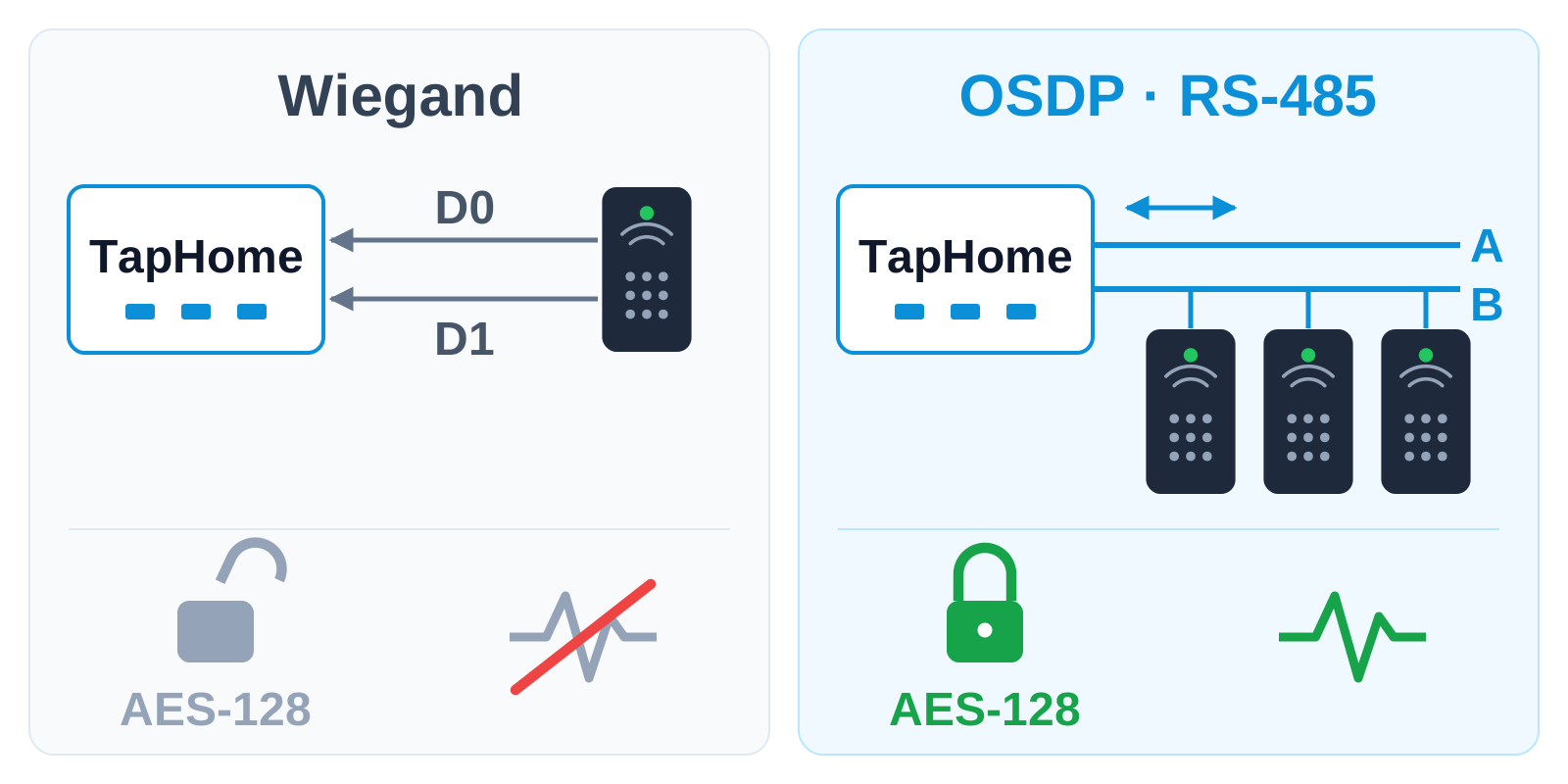
Today TapHome connects access readers over Wiegand. A Wiegand Gateway takes up to two readers, and every reader needs its own data wires. Wiegand sends the card code in one direction only and without encryption, so TapHome cannot tell that a reader was removed or its cable cut. The Wiegand Gateway also has no connection for the reader’s LED or buzzer, so the reader cannot show the result of TapHome’s decision.
OSDP (Open Supervised Device Protocol) is the open successor of Wiegand and many current card, PIN and fingerprint readers support it. It runs on a two-wire RS-485 line, talks in both directions, checks every reader all the time and can encrypt the traffic with the OSDP Secure Channel (AES-128, a key per reader).
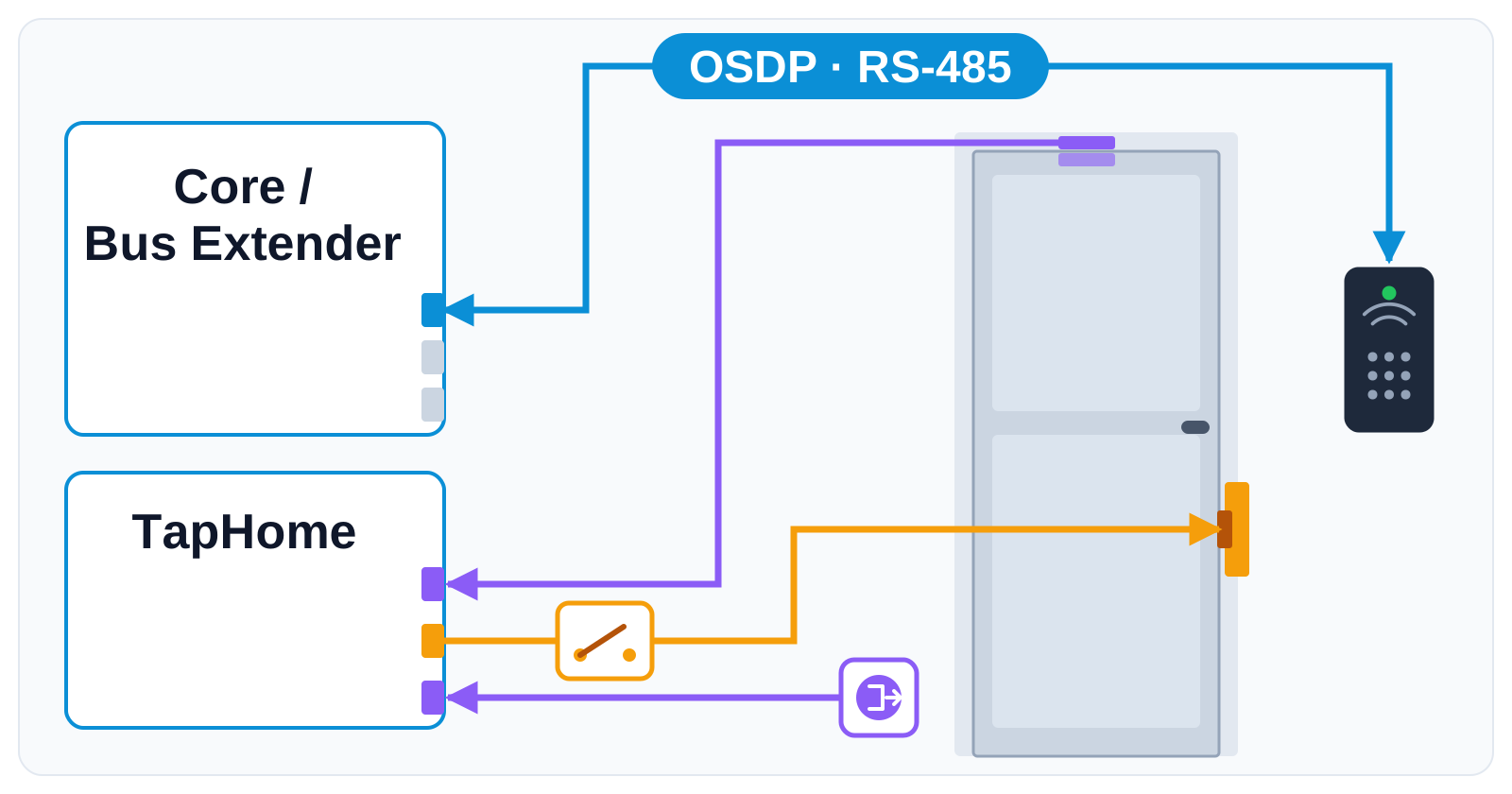
A typical door: the reader is mounted outside and its OSDP line runs to a bus port of the Core or of a Bus Extender that is reserved for the readers. A relay output switches the electric strike, and the door contact and the exit button are connected to TapHome inputs.
| Today, Wiegand | With OSDP | |
|---|---|---|
| Wiring | Own wires per reader | One RS-485 line |
| Direction | Reader to TapHome | Both directions |
| Encryption | None | Optional, AES-128 |
| Reader supervision | No | Yes, with tamper alerts |
| LED and buzzer | No | Controlled by TapHome |
What will be possible
We are collecting interest and requirements. Nothing below is scheduled yet.
- Several readers on one line. One RS-485 cable connects several readers: a gate, a front door and a garage, or an apartment building with several entrances.
- A bus port you already know. The readers would connect to a free bus port of the Core, the same terminals that carry TapHome modules or Modbus devices today. When the Core has no free port, a Bus Extender adds four more.
- Encrypted communication. The OSDP Secure Channel encrypts the traffic between TapHome and each reader with AES-128 and a key per reader.
- Supervision. TapHome polls every reader. A missing reader, a cut cable or a tamper alarm becomes a device warning that you can use in smart rules and notifications.
- Feedback from TapHome. TapHome decides about access, and the reader shows the result with a green or red LED and a beep.
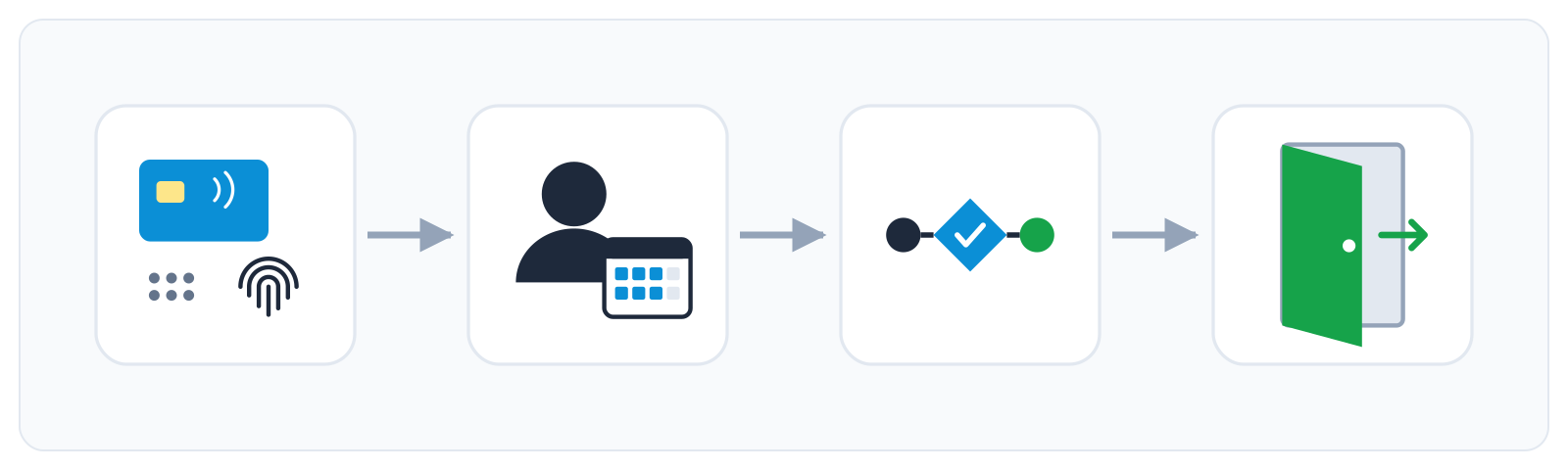
- The access management you know. Cards, PIN codes, users, weekly plans, the access log and the access smart rule work the same way as with Wiegand readers today, see Access control.
What will not be possible
- Sharing a bus port with TapHome modules or Modbus devices. The readers would need a bus port of their own. TapHome modules and Modbus devices stay on the other ports.
- Readers without OSDP. Readers that only offer Wiegand stay on the Wiegand Gateway. Readers with a manufacturer’s own bus are not covered.
- Fingerprints stored in TapHome. Fingerprint and face readers would work when the reader itself recognises the finger or face and sends an identity. TapHome would not store biometric data.
- The “OSDP Verified” mark. That certification is a separate third-party test program and would not be part of a first version.
How to solve it today
Access control works today with Wiegand readers:
- Readers on the Wiegand Gateway. Connect up to two Wiegand readers to a Wiegand Gateway and manage cards, PIN codes, users, weekly plans and the access log in the TapHome app, see Access control.
- Choose a reader with a Wiegand output. Many card readers offer both OSDP and Wiegand. Check the reader’s data sheet: a reader set to Wiegand works with TapHome today and could move to OSDP later.
- Door inputs and outputs. The Wiegand Gateway has two relay outputs, for example for the electric strike, and two inputs for the door contact and the exit button. The access smart rule opens the door when access is granted.
Learn more
- Access API, a separate idea about managing users, codes and door events from another system.
- Access control documentation.
- Wiegand Gateway for the readers you can connect today.
Which readers do you use, and how many doors share one site? Tell us what you need: vote for this idea, follow it for updates and answer the poll below.
What matters most to you in OSDP support?
Related
Status history
- Oct 18, 2026 Gathering interest Published
Comments 0
Sign in with your TapHome account to comment. The team approves comments before they appear.
No comments yet.
·
The original comment was deleted.
Ideas describe direction, not commitments. We do not publish dates; released features are announced in the release notes.
Sign in with your TapHome account to follow. We email you when something changes; unsubscribe in one click.
Confirming your vote…