
One-time scheduled action: set a device for a date and time, then back to automatic
Plan a one-off change on a device for a chosen date and time, for example a warmer living room when you come home early on Friday. It runs once, hands the device back to its smart rules and disappears, so no smart rule has to be edited and changed back.
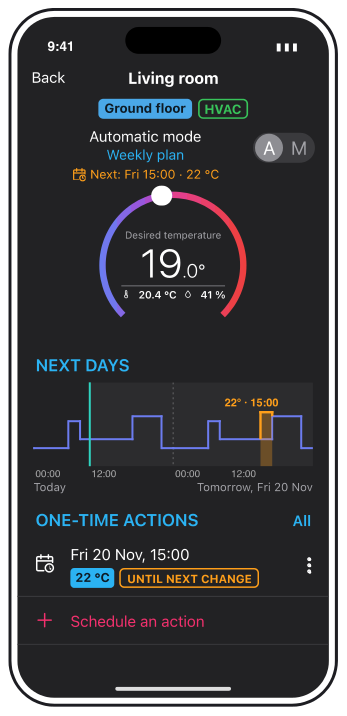
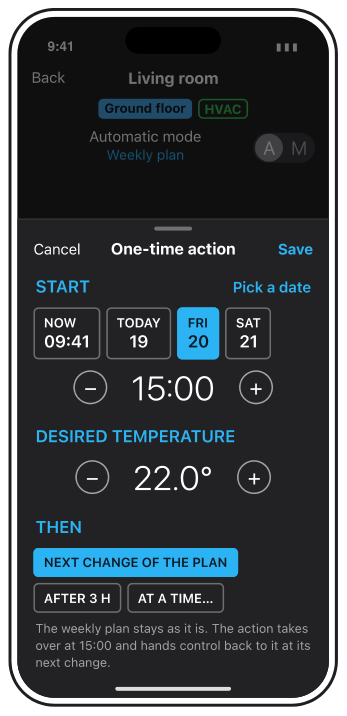
A draft: the thermostat detail shows the next days and the one-time actions, and a short panel sets the day, the time, the value and the end. The details may still change.
Why and how you would use it
Smart rules repeat: every workday, every weekend, every year. Life does not. On Friday you come home at 15:00 instead of 17:00 and want the living room warm, or the garden lights should stay on for one party. Today you change a smart rule for that one day and then have to remember to change it back.
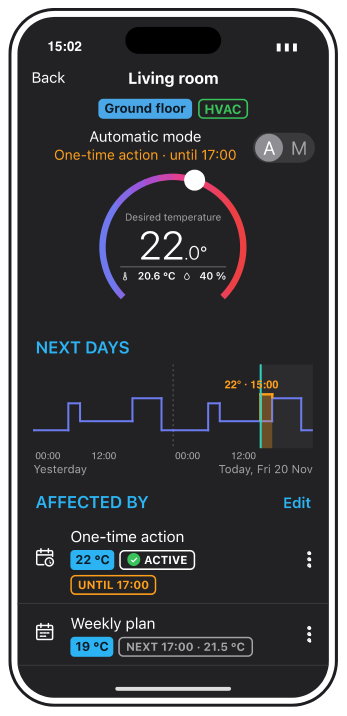
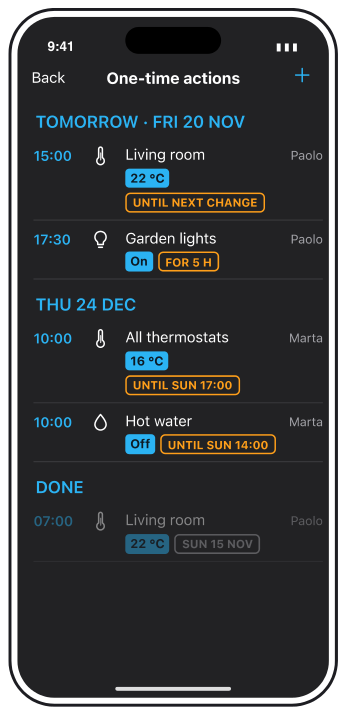
While the action runs, the thermostat stays in automatic mode and the action is listed under Affected by. The location keeps one list of all one-time actions, so nobody wonders why the living room is suddenly at 22 °C.
| Today | With this idea | |
|---|---|---|
| Warmer on one Friday | Edit a smart rule | One action on the device |
| Afterwards | Change it back | Removes itself |
| Overview | Inside smart rules | One list per location |
What will be possible
We are evaluating this idea. Nothing below is scheduled yet.
- A date and time for one device. Pick today, one of the next days or any date, a time and the value: temperature, brightness, position, on or off.
- Start now, too. Now keeps a value until the time you choose, without changing the manual override setting of the device.
- A clear end. Until the next change of the smart rule plan, after a set time, or at a date and time.
- Smart rules stay as they are. The action takes over for its time and then hands the device back to the smart rule that controls it. It is shown under Affected by like a smart rule, with its own priority.
- The next days at a glance. On a thermostat, a graph shows the desired temperature from the smart rules and the planned action for today and tomorrow.
- One list for the location. Every upcoming action with who set it, also for several devices at once, for example all thermostats during a holiday.
What will not be possible
- A repeating exception. A one-time action runs once. Something every year, such as public holidays, stays with date periods and smart rules.
- Beating a manual change or safety mode. A change in the app or on the device itself still wins, and safety mode, such as protection of blinds from wind, stays above everything.
- Editing the smart rule. The action does not change the weekly plan. To change every Friday, edit the Scheduler.
How to solve it today
- A manual change until the next automatic change. Set the temperature in the app. With the manual override option Keep manual mode until next automatic change, the value holds until the next smart rule action. See Default values and manual override.
- A date period for holidays. A date period drives a variable with the value 1 or 0, so a smart rule can act differently on those days. Whole days only. See Date periods.
- A temporary entry in the Scheduler. Add the action for that day and delete it afterwards. See Scheduler.
Learn more
- Scheduler explains how smart rules plan the week.
- Default values and manual override explains which source controls a device and in what order.
When would you use a one-time action? Vote, follow this idea and answer the poll below.
Related
Status history
- Nov 20, 2026 Gathering interest Published
Comments 0
Sign in with your TapHome account to comment. The team approves comments before they appear.
No comments yet.
·
The original comment was deleted.
Ideas describe direction, not commitments. We do not publish dates; released features are announced in the release notes.
Sign in with your TapHome account to follow. We email you when something changes; unsubscribe in one click.
Want to know when this moves forward?
Follow this idea to get an email when its status changes. Unsubscribe in one click.
Sign in with your TapHome account to follow. We email you when something changes; unsubscribe in one click.
Confirming your vote…