
Matter controller and Thread Border Router: add Matter devices over Wi-Fi, Ethernet and Thread to TapHome
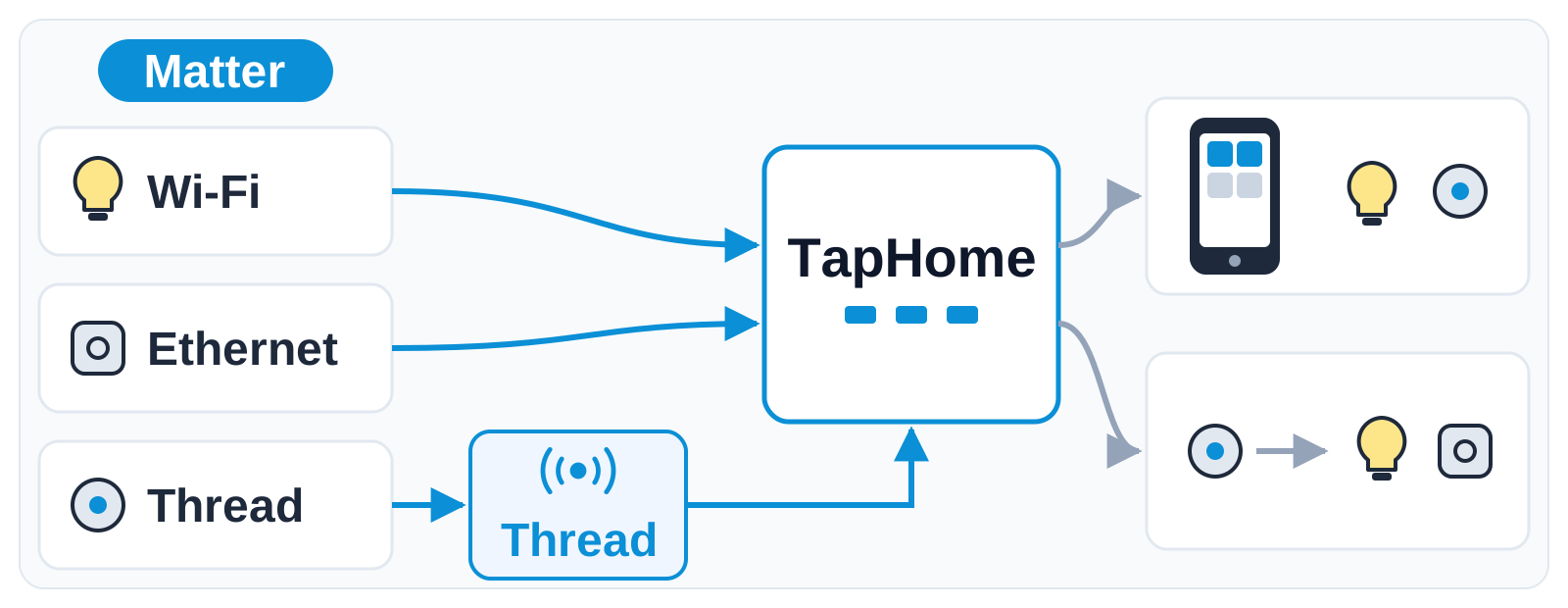
Pair Matter devices from other makers directly into TapHome, over Wi-Fi, Ethernet or Thread with TapHome's own Thread Border Router, and use them in smart rules like any other device.
Why and how you would use it
Matter is the common standard that many new smart home devices speak: plugs, bulbs, blinds, locks, thermostats and sensors from many makers. A device connects over Wi-Fi, Ethernet or Thread, and it works with any Matter controller.
Today TapHome does not control Matter devices directly. A client who buys a Matter plug, a Thread sensor or a Matter blind motor has to keep it in another app or hub, and TapHome cannot use it in smart rules.
A typical case: a house is already controlled by TapHome, and the owner adds a few Matter window contacts and a Matter plug in the garden. With this idea they are paired into TapHome and used like any other device, for example in the alarm, lighting or blinds smart rules.
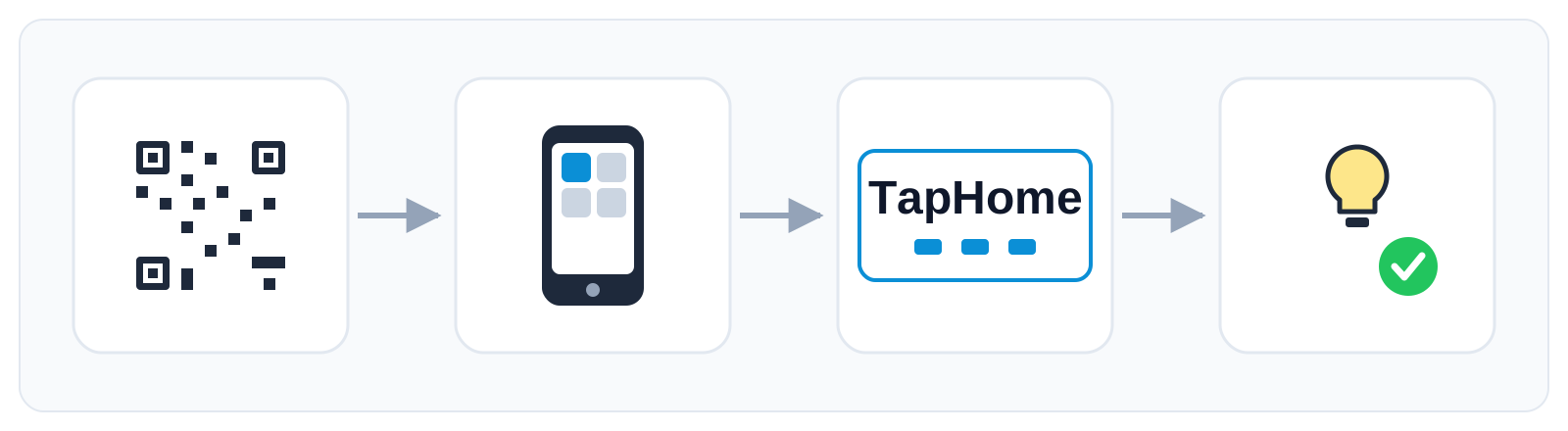
Pairing would follow four steps. You scan the QR code on the device or enter its setup code in the app. The app passes it to TapHome. TapHome joins the device to its network, over Wi-Fi, Ethernet or Thread. The device then appears in TapHome like any other device.
| Today | With this idea | |
|---|---|---|
| Matter devices | Another app or hub | Paired into TapHome |
| Thread devices | Third-party border router | TapHome as border router |
| Smart rules | Not possible | Like other devices |
| Setup | Another app and account | QR or setup code |
What will be possible
This is in development. We are still collecting requirements, and the exact device types in the first version are not decided. Nothing below is a promise of a date.
- TapHome as a Matter controller. Pair Matter devices on Wi-Fi or Ethernet straight into TapHome and use them in the app and in smart rules.
- TapHome as a Thread Border Router. A Thread radio module on the TapHome bus would connect Thread devices to the Core without an extra hub.
- Pairing with a setup code or a QR code. Bluetooth pairing would work through the Thread radio module or through your phone, and a Wi-Fi device could get the network you choose.
- Device types for a home. Switches and plugs, dimmable and colour lights, door locks, window coverings, thermostats, fans and valves, buttons, contact, flood, rain and presence sensors, temperature, humidity, light and air quality sensors, smoke and CO alarms, and energy metering.
- Devices behind other makers’ Matter bridges. A bridge from another maker, such as a lighting bridge, would show its devices in TapHome as separate devices.
- Fast state updates. TapHome would subscribe to every Matter device and receive changes at once instead of asking again and again.
What will not be possible
- Appliances, media and cameras. Fridges, washers, ovens, robot vacuums, media players, cameras and video doorbells are deliberately left out. Read more in Matter appliances, media players and cameras.
- Older Core models. Matter would need a Core 3.
- More than one Matter controller in a Core. One Core would run one Matter controller.
- Joining an Apple or Google Thread network in the first version. The first version would run its own Thread network.
- Automatic discovery. Devices would be added by pairing, not found on their own.
- Special rocker switches. Rockers with more than two momentary positions are not covered.
- Separate heating and cooling setpoints. A thermostat that can both heat and cool would get one setpoint.
How to solve it today
TapHome has no Matter support in a released version. Until it arrives, these options exist:
- Zigbee devices through a Zigbee2Tasmota gateway and MQTT, see Zigbee2Tasmota Gateway and MQTT Broker.
- Wi-Fi devices with a compatibility template, such as Shelly devices with their local API, or Nanoleaf lights. The Nanoleaf template controls even the Matter Essentials bulbs through Nanoleaf’s own API, not through Matter.
- Devices paired to SmartThings can be reached through the SmartThings template, which works over the SmartThings cloud.
- Packet Parser for devices with a local HTTP or MQTT interface, see Packet Parser.
- Choose devices that already have a template. Browse the compatibility list before you buy.
- Matter over Thread blinds are not supported today. The PowerView Hub page describes the situation for one such product.
Learn more
- Matter bridge: TapHome devices in Apple Home, Google Home and Alexa
- Matter versions of TapHome devices
- Matter appliances, media players and cameras
- Smart rules
Tell us which Matter devices you need first and whether you need Thread from the start: vote for this idea, follow it for updates and answer the poll below.
Which Matter devices should TapHome support first?
Related
Status history
- Oct 18, 2026 In development Published
Comments 0
Sign in with your TapHome account to comment. The team approves comments before they appear.
No comments yet.
·
The original comment was deleted.
Ideas describe direction, not commitments. We do not publish dates; released features are announced in the release notes.
Sign in with your TapHome account to follow. We email you when something changes; unsubscribe in one click.
Confirming your vote…