
LinkedGo ST802-B in TapHome: a fan coil thermostat powered by Shelly
Set the LinkedGo ST802-B fan coil thermostat (Powered by Shelly) from TapHome over its local Wi-Fi API: target temperature, fan speed, working mode, on/off, anti-freeze and target humidity, with room temperature and humidity. A beta template is in the TapHome portal.

Why and how you would use it
Many fan coil units have no data interface at all: they only have terminals for three fan speeds and a valve for heating or cooling, and a wall thermostat switches them. Without an integration, every room is set by hand on its own thermostat, and TapHome knows neither the room temperature nor what the fan coil is doing.
The LinkedGo ST802-B is such a wall thermostat, with Wi-Fi and a Shelly chip inside (“Powered by Shelly”). It switches the high, medium and low fan speed and the fan coil valve itself, measures room temperature and humidity, and Shelly documents a local API for it. TapHome can therefore set the thermostat over the local network, without any cloud. A community template for the ST802-B is now in the TapHome portal as a beta.
| Today | With this idea | |
|---|---|---|
| ST802-B template | Beta, being tested | Tested with a real thermostat |
| Fan coil set from smart rules | With the beta template | Confirmed in installations |
What will be possible
A community template for the ST802-B is in the TapHome portal as a beta, without a change to TapHome itself. It was tested on TapHome Core 2025.2 with a simulated thermostat, not yet with a real ST802-B, so each point below is still to be confirmed in a real installation.
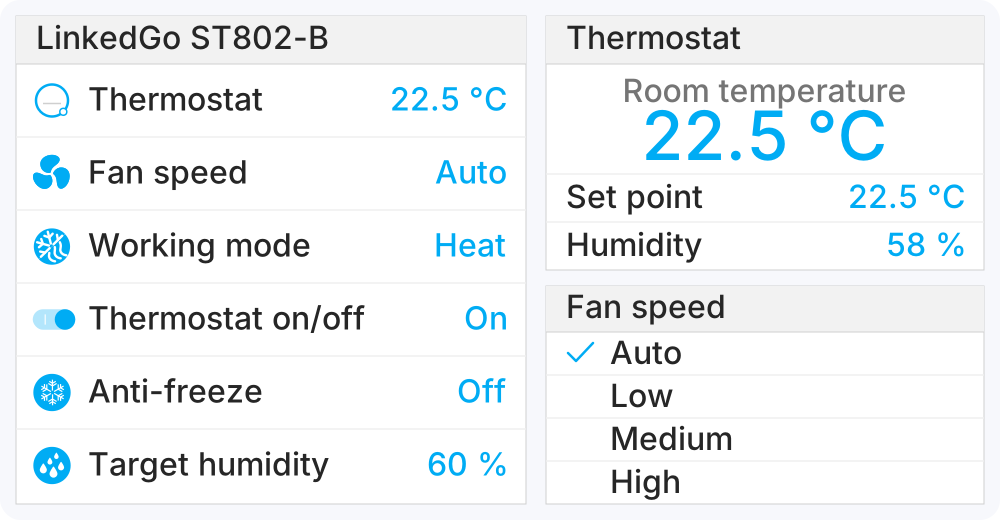
The illustration shows the six TapHome devices the template creates, with the values from the test: the thermostat, its detail with room temperature, set point and humidity, and the fan speed choice.
- Thermostat as a TapHome device. Room temperature, target temperature (5 to 35 °C, in steps of 0.5 °C) and room humidity, ready for smart rules, charts and schedules, for example a lower target temperature at night.
- Fan speed and working mode. Fan speed Auto, Low, Medium or High, and the working mode Cool, Heat, Dry, Ventilation or Floor heating. Which modes the thermostat offers depends on how the installer set it up for the fan coil.
- On/off, anti-freeze and target humidity. The thermostat function on or off, frost protection, and the humidity set point (40 to 75 %).
- The keypad stays in charge too. A change made on the thermostat shows up in TapHome within seconds, and after a restart of the TapHome Core every value is read from the thermostat, so a change made on the keypad is never overwritten.
- Service information. Wi-Fi network, IP address and signal strength, warnings for a new firmware, a required restart or a service error, and service actions for a firmware update and a reboot.
What will not be possible
- Which output runs right now. The Shelly API does not report which fan speed or valve the thermostat is switching at the moment, so TapHome shows the settings, not the relay outputs.
- Password protection on the thermostat. TapHome does not support the HTTP Digest authentication of Shelly Gen2+ devices, so password protection must stay off in the Shelly app.
- Installer settings from TapHome. The fan coil type, the switching differentials and the calibration offsets are set on the thermostat or in the Shelly app.
- Degrees Fahrenheit. The template reads the values as degrees Celsius and warns when the thermostat is set to Fahrenheit.
How to solve it today
- The beta template for the ST802-B. Import the ST802-B template from the TapHome portal (the card above) into a Packet Parser interface and enter the IP address of the thermostat. Give the thermostat a fixed IP address in the router, keep password protection off and the temperature unit in Celsius.
- Fan speeds switched by TapHome directly. Without a wall thermostat, the three fan speeds and the valve can be wired to relay outputs of TapHome modules and switched by smart rules.
- Fan coils with a data interface. Some fan coil units talk to TapHome directly, for example the Olimpia Splendid Fan Coil (Bi2).
Learn more
- Packet Parser templates in the TapHome documentation: how to import a template and reuse it in other installations.
- Heating and cooling modes in TapHome.
- LinkedGo Smart HVAC Thermostat in the Shelly API documentation.
Do you run the ST802-B with a 2-pipe or a 4-pipe fan coil, and which working modes does your thermostat offer? Try the beta template and tell us in the comments how it works, vote for this idea and follow it for updates.
Requirements
- A connection to the device: http
Related
Status history
- Nov 4, 2026 Beta Published
Comments 0
Sign in with your TapHome account to comment. The team approves comments before they appear.
No comments yet.
·
The original comment was deleted.
Ideas describe direction, not commitments. We do not publish dates; released features are announced in the release notes.
Sign in with your TapHome account to follow. We email you when something changes; unsubscribe in one click.
Confirming your vote…