
IVT heat pumps with the Rego 2000 controller
Connect IVT heat pumps with the Rego 2000 controller to TapHome through the Husdata H66 gateway: heat pump state, operating mode, blocking of heating or cooling and errors as warnings.
Why and how you would use it
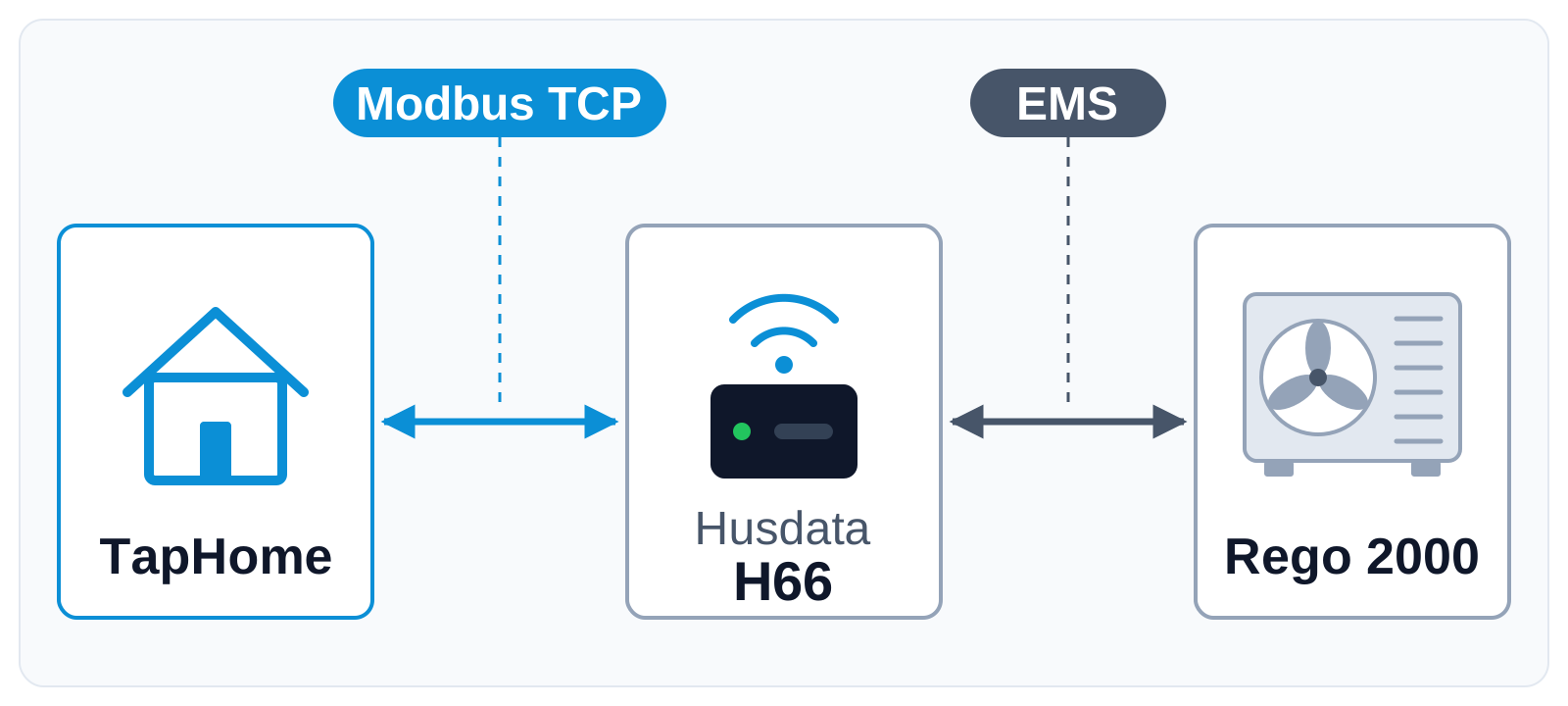
An IVT heat pump with the Rego 2000 controller heats, cools and prepares hot water on its own, but TapHome has no ready connection to it today. The heat pump maker publishes no Modbus register map, and the controller’s own network module encrypts its communication, which TapHome cannot read.
For a house where TapHome controls everything else, that is a gap. A typical spring day: TapHome switches the house to cooling, the floor zones and the blinds follow, but the heat pump keeps heating until someone changes the mode on its panel.
There is a way without a change to TapHome. The Husdata H66 gateway connects to the Rego 2000 controller over its EMS bus and offers a Modbus TCP server with a published list of heat pump values. A community template for the H66 would turn those values into TapHome devices. The H66 has not been tested with TapHome yet.
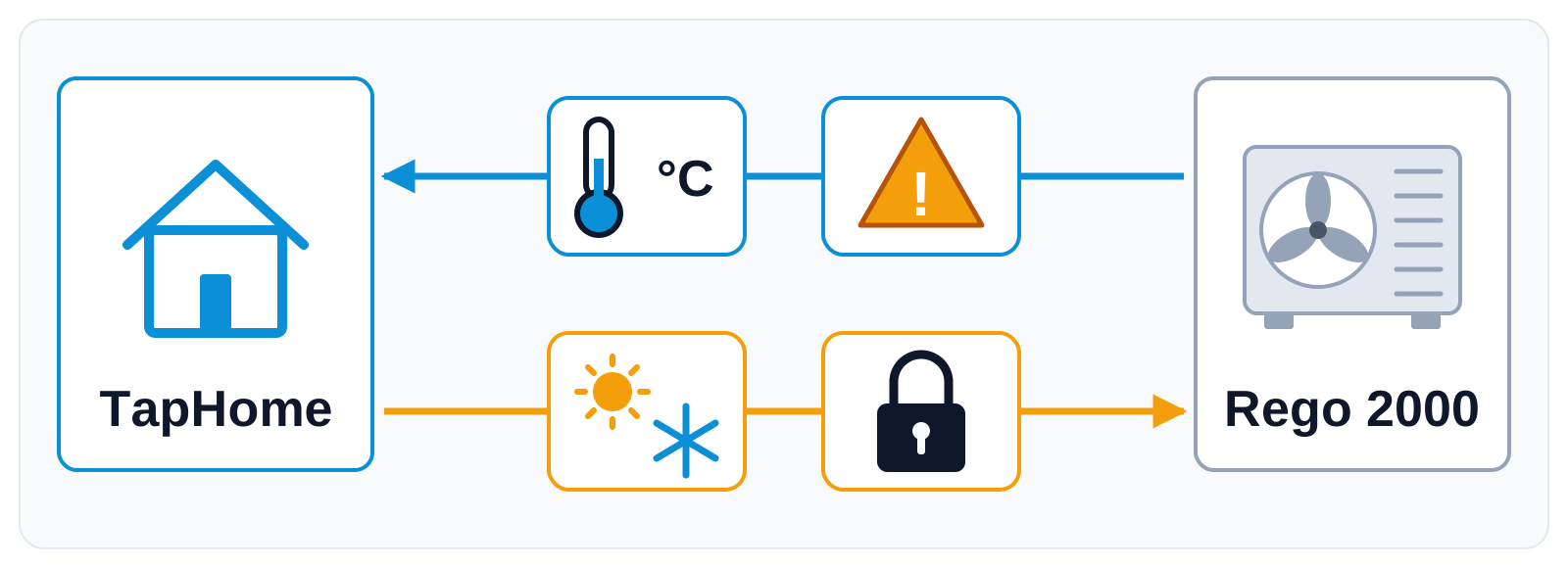
Values would travel both ways: temperatures and alarms from the heat pump to TapHome, the operating mode and blocking of heating or cooling from TapHome to the heat pump.
| Today | With this idea | |
|---|---|---|
| Heating or cooling | Set on the heat pump | Mode set from TapHome |
| Heat pump state | Its own app only | TapHome devices |
| Heat pump errors | On its panel | Warning in TapHome |
What will be possible
We are collecting interest. The idea would be delivered as a community template for the Husdata H66 gateway in the TapHome portal, without a change to TapHome itself. Nothing below is scheduled.
- Heat pump state in TapHome. Outdoor, supply, return and hot water temperatures, the compressor state and the energy counters as TapHome devices that you can use in smart rules.
- Operating mode from TapHome. The heating circuit mode Auto, constant heating or off, so a smart rule can follow the Heating & Cooling mode of the installation.
- Blocking heating or cooling. The gateway can switch the heat pump’s external control inputs. What each input blocks is set in the heat pump’s service menu.
- Setpoints. Room temperature, cooling temperature and the hot water program.
- Warnings in TapHome. The heat pump alarm and its latest error code as a device warning that can send a notification.
What will not be possible
- Forcing cooling on. The gateway offers the modes Auto, constant heating and off. In Auto the heat pump’s controller decides when to cool, so TapHome can allow or block cooling, but not start it.
- A connection without the gateway. The Rego 2000 network module encrypts its communication, and TapHome scripts cannot decrypt it. The template needs the Husdata H66 in between.
- Replacing the heat pump’s own control. The Rego 2000 controller keeps running the compressor, defrosting and safety functions. Installer and service parameters stay on its panel.
- Two Modbus clients at once. The H66 serves one Modbus TCP client at a time, so TapHome and another system cannot share its Modbus connection.
How to solve it today
- External inputs of the heat pump. If your heat pump has inputs for blocking heating or cooling (see its installation manual), a TapHome relay output can switch them, and a smart rule can drive that output from the Heating & Cooling mode. Check the input rating in the manual: low-current inputs need a signal relay with gold contacts between them and the TapHome relay.
- The H66 as your own Modbus TCP module. Until the template exists, you can add the H66 to TapHome as a Modbus TCP module and set up the values by hand, see Modbus. The H66 home page shows the register number of each value, temperatures come multiplied by 10, and the numbers can change after an update of the H66 firmware.
- Heat pumps that TapHome supports today. Several heat pumps connect over Modbus, for example NIBE, Midea and Stiebel Eltron models. See the compatibility list.
Learn more
- Heating and cooling modes in the TapHome documentation.
- Modbus devices and templates in TapHome.
- Community templates in the TapHome portal.
Do you install IVT or Bosch heat pumps, and what would you control from TapHome? Vote for this idea, follow it for updates and answer the poll below.
Requirements
- A connection to the device: Modbus TCP (Husdata H66)
Which heat pump controller do you install most often?
Related
Status history
- Oct 18, 2026 Gathering interest Published
Comments 0
Sign in with your TapHome account to comment. The team approves comments before they appear.
No comments yet.
·
The original comment was deleted.
Ideas describe direction, not commitments. We do not publish dates; released features are announced in the release notes.
Sign in with your TapHome account to follow. We email you when something changes; unsubscribe in one click.
Confirming your vote…