
Daikin Onecta in TapHome: control Daikin air conditioners and heat pumps through the Daikin cloud
Link your Daikin Onecta account to TapHome to switch Daikin air conditioners and Altherma heat pumps on and off, set mode, temperature and fan, and use them in smart rules, without a Modbus adapter on each unit. Status would update every few minutes.


A draft of how Daikin units linked from the Daikin account could look in the TapHome app. The details may still change.
Why and how you would use it
Many new Daikin units come with Wi-Fi built in or with a Daikin Wi-Fi adapter, and their owners control them with the Daikin Onecta app: wall-mounted split air conditioners as well as Daikin Altherma heat pumps. Installers keep asking whether TapHome can control these units too, without adding another box to each indoor unit.
Today TapHome connects Daikin over Modbus: a Modbus adapter on each split unit, or a Modbus gateway on the Altherma heat pump, wired to the Core over RS-485 or to the network. That gives fast and local control, but it needs an adapter and a cable for each unit. The newer Daikin Wi-Fi adapters have no documented local interface. Daikin offers its official Onecta cloud API instead.
A typical case: a flat with three Daikin splits that the owner already controls in Onecta. When the owner leaves, the “Leaving home” button in TapHome should switch the air conditioners off, and an hour before they come back a smart rule should start cooling the bedroom. Today TapHome cannot see these units at all.
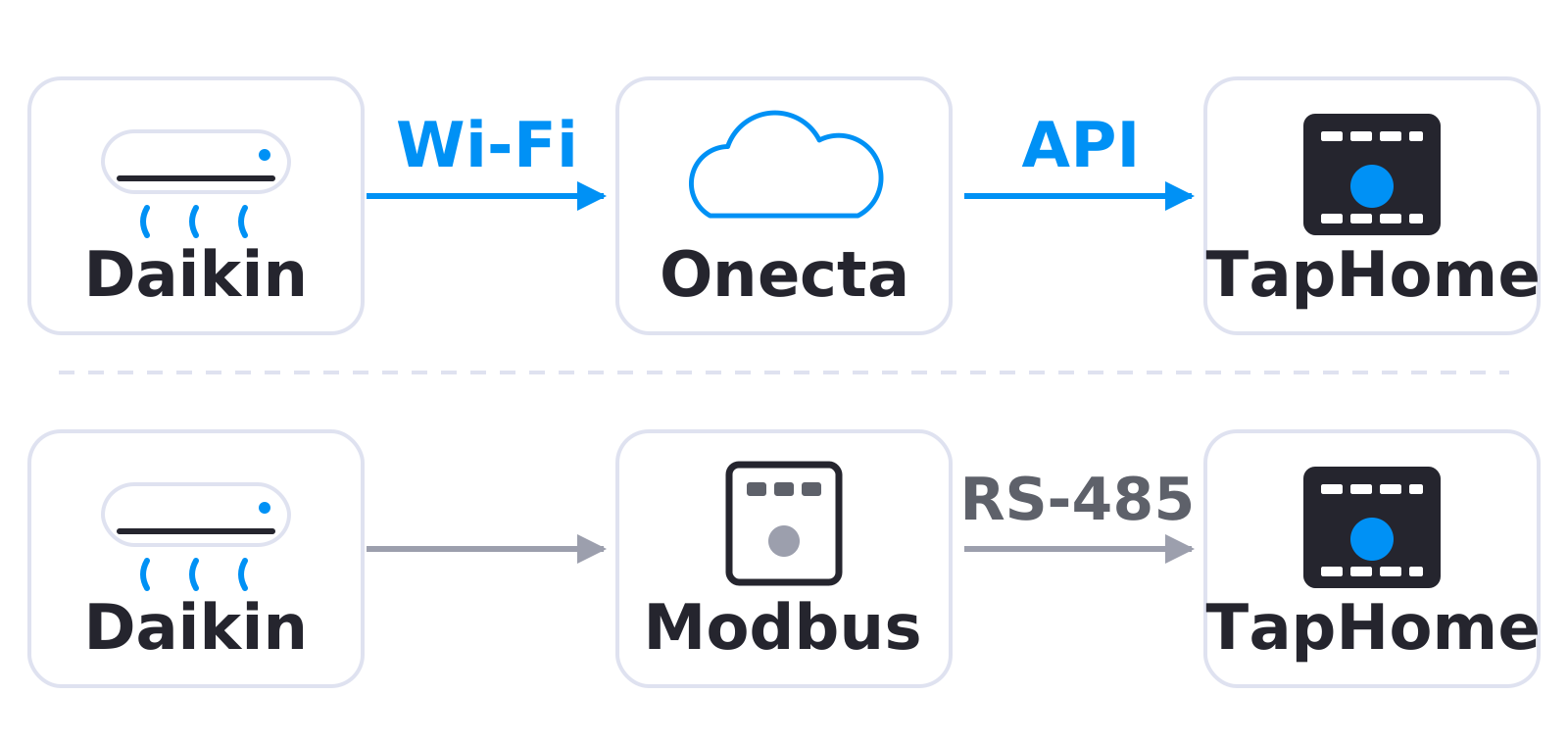
With this idea, the unit would reach TapHome over its own Wi-Fi and the Daikin cloud, without extra hardware (top). Today each unit needs a Modbus adapter wired to TapHome (bottom).
| Today | With this idea | |
|---|---|---|
| Wi-Fi only units | Not in TapHome | TapHome devices |
| Extra hardware | Adapter per unit | None |
| Status update | Seconds over Modbus | Every few minutes |
What will be possible
We are evaluating this integration. Nothing below is scheduled yet, and the details may still change.
- Link your Daikin account in the TapHome app. You would sign in on the Daikin login page and allow TapHome to access your units. TapHome would never see your Daikin password and would keep the connection renewed on its own.
- Air conditioners as TapHome devices. For each unit in your Onecta account: on and off, operating mode (cooling, heating, auto, dry, fan), target temperature, fan speed and louvre direction, as far as the unit offers them in Onecta.
- Altherma heat pumps. Room heating on and off with its target temperature, and domestic hot water on and off with its temperature, as far as the unit offers them in Onecta.
- Status and warnings. Room temperature, the outdoor temperature where the unit reports it, and the error and warning state of the unit, shown in TapHome and usable in notifications.
- Smart rules. Daikin units in away mode, schedules, scenes and rules such as “switch the air conditioner off when the window opens”.
What will not be possible
- Instant reaction. Daikin allows each user only a limited number of calls to its cloud per day, for all units together. TapHome would read the state every few minutes, and a command sent from TapHome would show its result with the next read. Daikin itself says its cloud API is not meant for fast control loops, such as following solar surplus minute by minute.
- Control without the internet. Everything would go through the Daikin cloud. When the internet or the Daikin cloud is down, TapHome could not control the units. The units keep running with their last setting, and the Daikin remote controller still works.
- Units that Onecta does not show. A unit without a Daikin Wi-Fi adapter, or one that does not appear in your Onecta app, could not be connected this way. For such units, use a Modbus adapter.
- Use outside Europe, the Middle East and Africa. Daikin offers its Onecta cloud API only for customers in this region.
- Everything else from Onecta in a first version. Onecta schedules, energy statistics and special modes of individual models are not part of the first version.
How to solve it today
- Split air conditioners over Modbus. Daikin RTD-RA for wall-mounted splits and Multi-split units over RS-485, or IntesisBOX DK-AC-MBS-1 over Modbus TCP.
- Altherma 3 heat pumps. The DCOM-LT/MB Modbus gateway, see Daikin Altherma 3 Heat Pump.
- VRV and Sky Air systems. Daikin DTA116A51 VRV Gateway or IntesisBOX DK-RC-MBS-1.
- Without a data connection. A TapHome relay output can switch the unit on and off, if the unit has a contact input for it (see its installation manual).
Learn more
- Air conditioning documentation.
- Modbus documentation.
- Daikin Developer Portal: Daikin’s own page about the Onecta cloud API, its rate limit and the region it covers.
Do you install Daikin units together with TapHome? Tell us which units you would connect over the Daikin cloud: vote for this idea, follow it for updates and answer the poll below.
Related
Status history
- Nov 4, 2026 Gathering interest Published
Comments 0
Sign in with your TapHome account to comment. The team approves comments before they appear.
No comments yet.
·
The original comment was deleted.
Ideas describe direction, not commitments. We do not publish dates; released features are announced in the release notes.
Sign in with your TapHome account to follow. We email you when something changes; unsubscribe in one click.
Confirming your vote…