
Core A
OnlineMain house
Entrance light
Hall light
Workshop sockets
Hall temperature
Gate
Workshop meter
Confirmed by Workshop. Smart rules can run on both Cores.
Cores on one site would share devices through an MQTT broker as if they were local: the other Core finds them with their name, icon, zone and category, controls them, sees their manual mode with its end time and knows when a Core is offline.
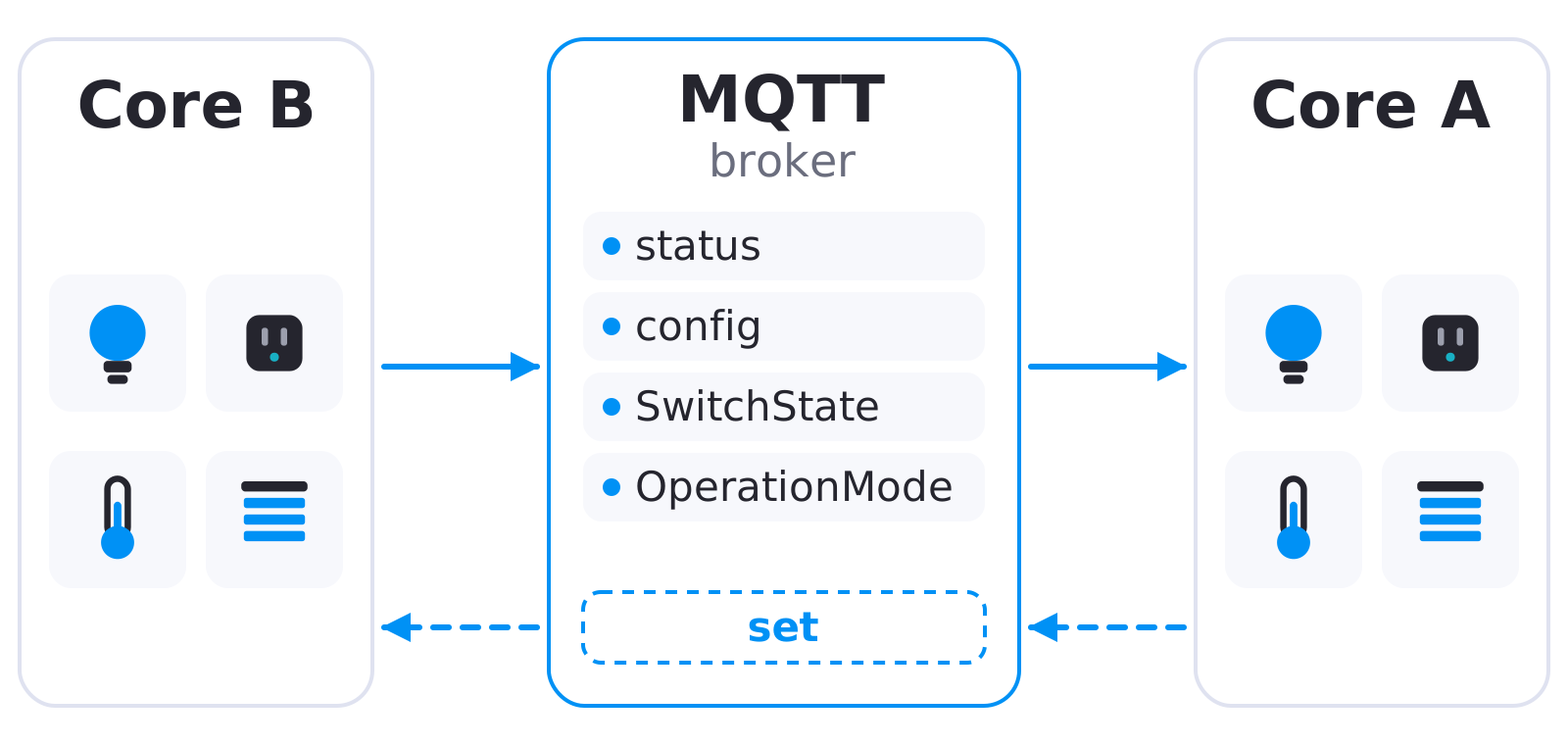
A site with more than one building often ends up with more than one Core: the TapHome bus runs over copper only, so a workshop, a garage or a second house gets its own Core, connected to the main one over the local network. Today the two Cores share devices over Modbus TCP, register by register. Each shared device is set up again on the other Core, and its name, icon, zone, category and manual mode stay behind.
Take a family house and a workshop across the yard. The workshop Core runs the hall light, the sockets, the gate and a meter. To see and switch them in the house, someone adds each device to the house Core by hand, from a list of registers. When the workshop light is switched to manual mode, the house does not know, and a third building means another interface and another list of registers.
All Cores of a site would use one MQTT broker. Each Core would publish its devices under its own name, so every Core can see the others and tell where a device comes from.
| Today | With this idea | |
|---|---|---|
| Adding a device | Register by register | Found automatically |
| Name, icon, zone | Set again by hand | Taken over |
| Manual mode | Not shown | Shown with end time |
| Another Core | New list of registers | Found on the broker |
Try an event. See what crosses the broker, and what changes on the other Core.
Control both ways: the Hall light of Workshop was switched on from Main house.
Watch for Main house waits for the value from Workshop. Sending a command is not a change of state.
Confirmed by Workshop. Smart rules can run on both Cores.
Main house ⇄ broker ⇄ Workshop · 2 messages
/devices/hall-light/SwitchState/devices/hall-light/set/SwitchStateTopic prefix taphome/v1/site-a/workshop
command last will
Owns these devices. Carries out commands and publishes their state.
One device identity. The same confirmed state on both Cores.
taphome/v1/{site}/{core}| Topic | Content | Retained |
|---|---|---|
/status | online / offline, last will | Yes |
/devices/{id}/config | Name, type, icon, zone, category, values | Yes |
/devices/{id}/{valueType} | Current value | Yes |
/devices/{id}/OperationMode | Automatic, or manual with end time | Yes |
/devices/{id}/set/{valueType} | Command from another Core | No |
The idea would make devices of another Core feel like local ones. Nothing below is scheduled.
Do you run a site with several Cores, and which of them would you link first? Vote for this idea and follow it for updates.
Sign in with your TapHome account to comment. The team approves comments before they appear.
No comments yet.
·
The original comment was deleted.
Ideas describe direction, not commitments. We do not publish dates; released features are announced in the release notes.
Sign in with your TapHome account to follow. We email you when something changes; unsubscribe in one click.
Want to know when this moves forward?
Follow this idea to get an email when its status changes. Unsubscribe in one click.
Sign in with your TapHome account to follow. We email you when something changes; unsubscribe in one click.
Confirming your vote…
How helpful was this?
We'll pass your question to our technicians. We usually reply within 24 hours.
We only offer installations where you have Admin or Service. Core 1 does not get the beta — the assistant will tell you.
✦
🌙 The support assistant is away right now. The reply comes when it is back.
For a reply by e-mail, use "Leave a contact" in the AI Assistant.
The AI Assistant answers from the documentation; under its answer you can leave a contact.
We need you to sign in so the assistant can see which installations you have Admin or Service on.
We can't see an installation with the Admin or Service permission on your account — the assistant replies without looking into an installation.
Support will see the page, your question and your conversation with the AI Assistant.
The reply comes to WhatsApp on your phone.
The WhatsApp message was not sent within 60 minutes.
You are among the first partners who can roll out 2026.1 to customers. The support assistant does the upgrade for you on WhatsApp or by e-mail — it checks the unit and makes a backup before the change.
Try 2026.1 before everyone else. The support assistant does the upgrade for you on WhatsApp or by e-mail — it checks the unit and makes a backup before the change.
The beta may contain bugs. We make a backup before the upgrade.
Your question is with our technicians. Meanwhile, feel free to keep asking.