
Confirm before action: the app asks before it opens a garage door or gate
One accidental tap in the app can open a garage door or a gate. For devices you choose, the app would first ask a short question, and the command would go out only after you confirm.
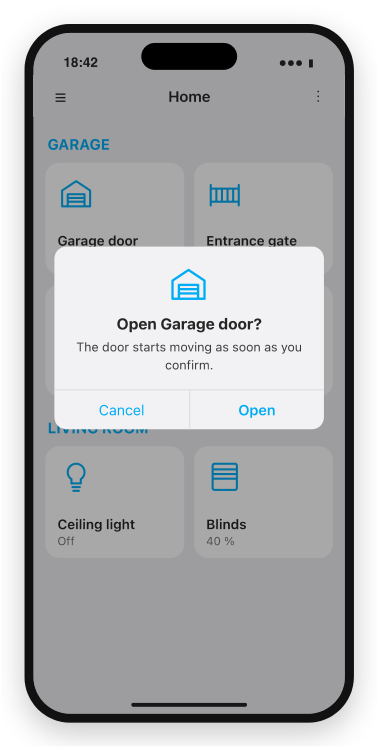
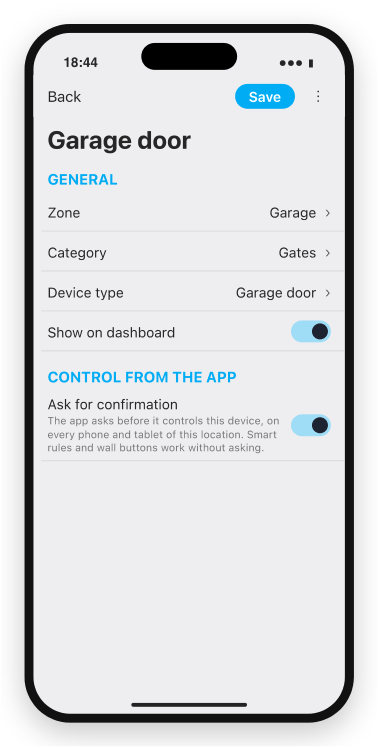
A draft: a tap on the garage door asks first, and the switch Ask for confirmation turns this on per device. The details may still change.
Why and how you would use it
A garage door, a gate or a door lock sits on the dashboard next to lights and blinds, and one tap opens it. A tap meant for the garage light, or a tap in the pocket, moves the door, and you walk to the garage to check.
| Today | With this idea | |
|---|---|---|
| Tap on a garage door | Opens at once | Asks first |
| Accidental tap | Door moves | Cancel, nothing moves |
| Which devices ask | None | Those you choose |
What will be possible
We are evaluating this idea. Nothing below is scheduled yet.
- A question before the action. Open Garage door? with Cancel and Open. The command goes out only after Open.
- Chosen per device. On for the garage door, the gate and a lock, off for lights and blinds.
- The same on every phone. The setting belongs to the device, so every phone, tablet and wall panel of the location asks.
- Everywhere in the app. On the dashboard, in the device detail and on the control buttons of a schema.
What will not be possible
- Protection against another person. It stops an accidental tap. Who may control a device is set by permissions.
- A PIN or Face ID for each action. A first version asks a simple question.
- Confirmation outside the app. Smart rules, wall buttons, card readers, Siri shortcuts and the TapHome API control the device without asking.
- Knowing that the door really moved. That is shown by a garage door sensor, as today.
How to solve it today
- Move the gate away from everyday devices. Hide it from the main dashboard and give it its own section. See Dashboards, zones and categories.
- Limit who can control it. See Users and permissions.
- Lock the app. Require user authentication asks for a PIN or biometrics when the app opens. See Application settings.
- Get notified when it stays open. The Open window notification smart rule works with a garage door sensor. See Window open notification.
Learn more
- Window open notification has an example for a garage door.
Which devices would you protect with a confirmation? Vote, follow this idea and answer the poll below.
Requirements
- TapHome app; new features arrive first in TapHome Next
Related
Status history
- Nov 4, 2026 Gathering interest Published
Comments 0
Sign in with your TapHome account to comment. The team approves comments before they appear.
No comments yet.
·
The original comment was deleted.
Ideas describe direction, not commitments. We do not publish dates; released features are announced in the release notes.
Sign in with your TapHome account to follow. We email you when something changes; unsubscribe in one click.
Confirming your vote…