
Circadian light: colour temperature and brightness that follow the day
A new smart rule moves tunable white and colour lights through the day: cool and bright in the morning, warm and soft after sunset, a dim warm glow at night. You set a few intervals by the clock or by sunrise and sunset, and the lights glide between them.
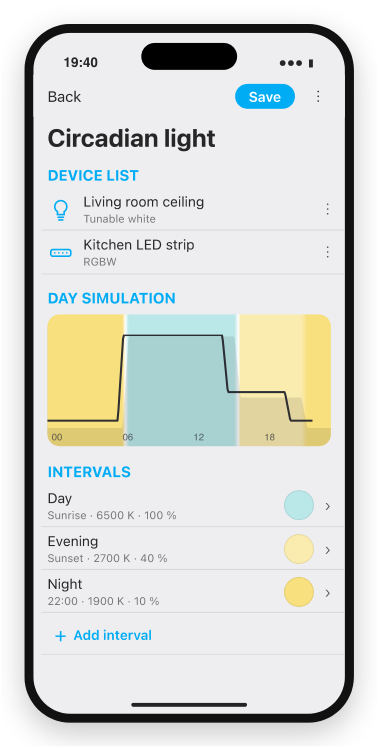
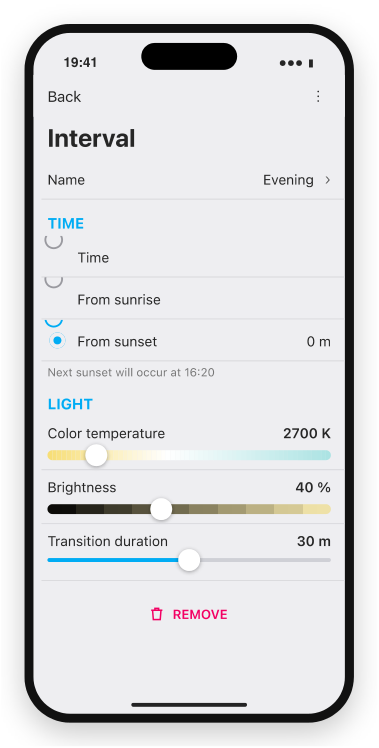
A draft of the new smart rule: the lights, a picture of the whole day and the intervals, and one interval with its time, colour temperature, brightness and transition. The details may still change.
Why and how you would use it
Light that suits midday does not suit the evening. Cool, bright light helps you wake up and concentrate, while warm, dim light in the evening helps you wind down before sleep. Tunable white lights can do both, but someone has to change the colour temperature and the brightness through the day.
A typical case: the living room and the kitchen have tunable white lights. In the morning they should be cool and bright, after sunset warm and softer, and after ten in the evening only a dim, very warm glow. Nobody wants to change that by hand every day, and the change should be slow enough that nobody notices it.
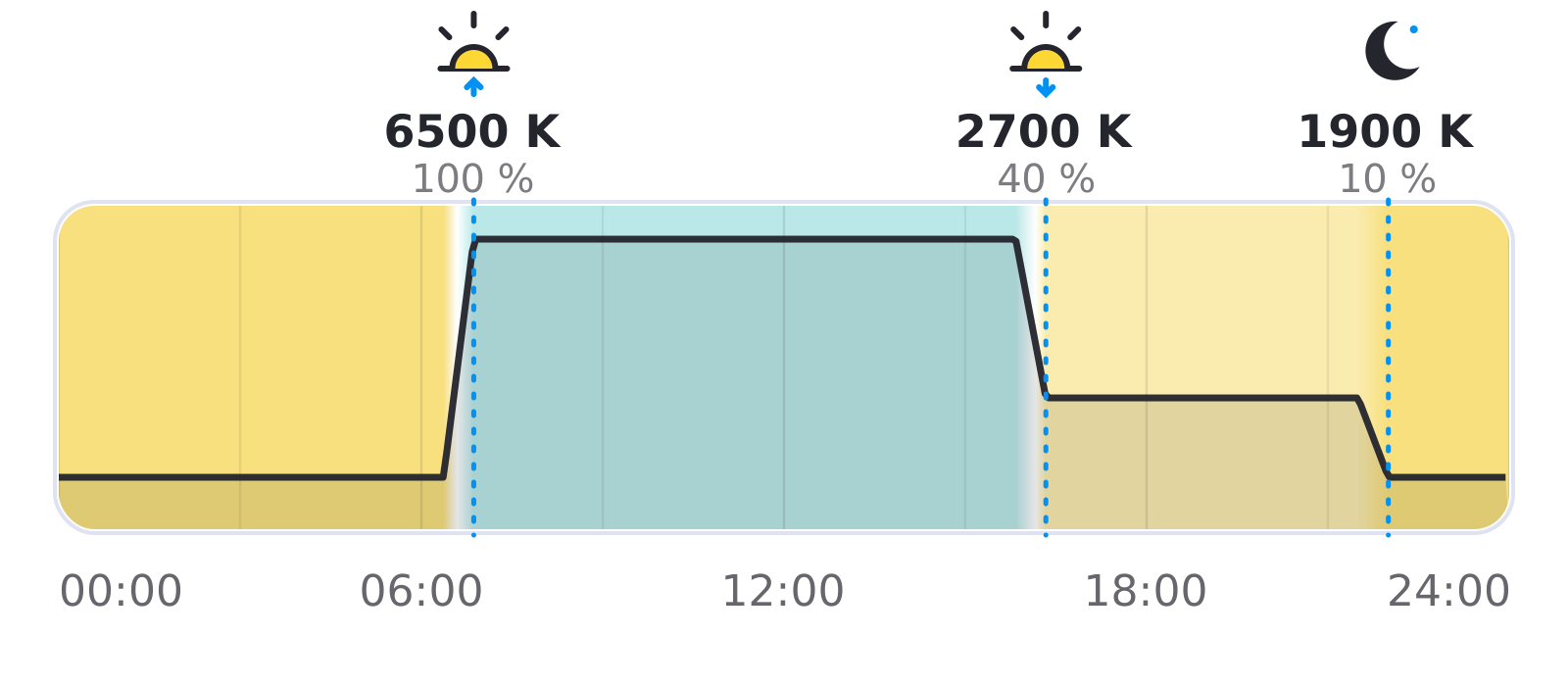
With this idea, you set a few points of the day, and the lights glide from one to the next. The morning point follows sunrise and the evening point follows sunset, so the curve moves with the seasons by itself.
| Today | With this idea | |
|---|---|---|
| Colour through the day | Separate actions | One smart rule |
| Change | At set moments | Smooth transition |
| Lights that are off | Need care | Stay off |
| Whole day | No overview | Day simulation |
What will be possible
We are working on this idea. The details may still change, and nothing below has a release date.
- A new smart rule for lights. Choose tunable white lights and colour lights, and the smart rule sets their colour temperature and brightness through the day.
- Intervals that you name and set. Each interval starts at a fixed time or at sunrise or sunset with an offset, and has its own colour temperature and brightness. A new smart rule starts with Day at sunrise (6500 K, 100 %), Evening at sunset (2700 K, 40 %) and Night at 22:00 (1900 K, 10 %).
- Smooth transitions. Each interval has a transition of up to an hour. The light reaches the next interval’s values exactly when that interval starts.
- Lights stay off when they are off. The smart rule never switches a light on or off. A light that is switched on mid-way comes on with the colour and brightness that fit that moment of the day.
- A picture of the whole day. The smart rule shows the colour of every hour and the brightness curve, with a line for the current time.
- Each light within its own range. The colour temperature is kept within what each light can do.
- Full light from a button. With a Lighting controller, a wall button can switch the light on at 100 %, also at night, and the light would keep that brightness until it goes off, also when the next interval begins.
- Back to the curve after the light goes off. The next time a motion sensor switches the light on, it would come on with the values of that moment again, not with the brightness the button set.
What will not be possible
- Switching lights on in the morning. The smart rule only changes lights that you switch on. Switch them with a Scheduler, a Lighting controller or a button.
- A different curve on weekends. One curve applies to every day.
- Different curves for rooms in one smart rule. All lights in one smart rule follow the same curve. Use one smart rule per room.
- Following the real light outside. The curve is set by you and follows the time and the sun’s schedule, not a brightness sensor.
- The same white on colour lights. A colour light mixes white from colours, so it looks less natural than a tunable white light, and its shade can change in a step instead of gliding.
How to solve it today
- Scheduler. Set the colour temperature and brightness of a light at fixed times or with an offset from sunrise or sunset. Each change is a separate action at one moment. See Scheduler.
- Light scenes. Prepare a warm evening scene and a bright day scene and switch between them. See Light scene.
- Tunable white lights. How to connect and set them up: PWM dimming.
With a motion sensor and a wall button


A typical bathroom or hallway: a motion sensor switches the light on and a wall button gives full light. With Circadian light, one Lighting controller per light is enough, instead of one copy of the smart rule for each part of the day:
- Automatic Turn On with Last Value. The motion sensor switches the light on with the brightness that Circadian light prepared for that moment, and the colour temperature is already set.
- A Turn on button. A short press gives full light (100 %, the default value), also when the motion sensor switched the light on dimmed.
- The motion sensor also in Automatic Turn Off. With the button override set to a fixed time, a light switched on with the button also goes off after the turn-off delay.
Learn more
- Location in the app: sunrise and sunset are calculated from the location of the installation, so it has to be right.
- Lighting controller: buttons, motion and presence sensors in one smart rule.
- Smart rules
Which rooms would you light this way, and what curve would you choose? Vote for this idea, follow it for updates and tell us in the comments.
Related
Status history
- Nov 7, 2026 In development Published
Comments 0
Sign in with your TapHome account to comment. The team approves comments before they appear.
No comments yet.
·
The original comment was deleted.
Ideas describe direction, not commitments. We do not publish dates; released features are announced in the release notes.
Sign in with your TapHome account to follow. We email you when something changes; unsubscribe in one click.
Confirming your vote…