
Access API: manage users, codes and door events from another system
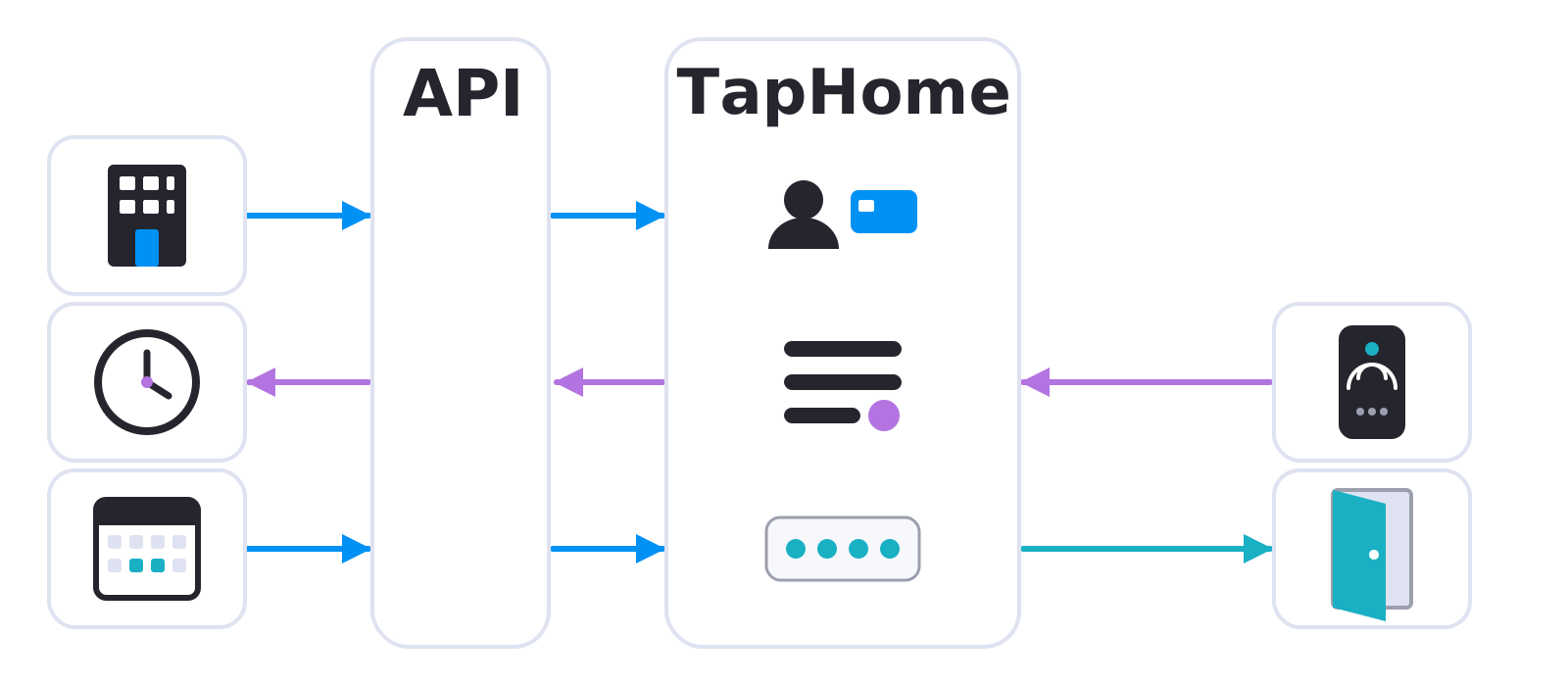
A way for booking, building or HR systems to manage TapHome users, cards, PIN codes and their validity, and to receive access events as they happen.
Why and how you would use it
TapHome already manages access: users, cards, PIN codes with a validity period, weekly plans and an access log. All of it is set up by hand in the TapHome app. That is fine for one family house. It becomes a chore when another system already knows who should get in, where and when.
Take a guesthouse or a set of holiday apartments with a booking system. For every booking someone has to create a PIN code in TapHome, set its dates and choose the doors and the weekly plan it works with. The code stops working on its own after its last day, but the setup is still manual, and one typo means a guest standing in front of a locked door.
The same pattern appears in a gym or a coworking space that sells memberships and room bookings, in a building administration that keeps a list of tenants, or in a company where the HR system knows who works there. In each case the other system holds the truth and TapHome only needs to follow it.
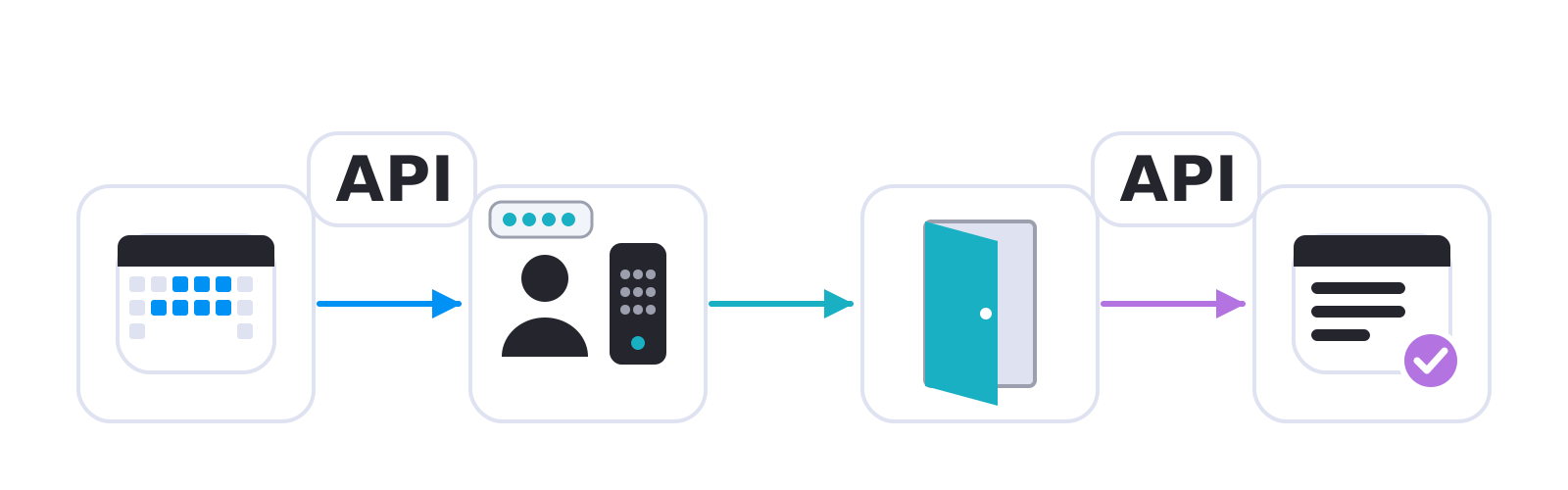
A typical stay: the booking creates a code for the dates of the reservation, the guest enters it at the reader, the door opens, and the event goes straight back to the booking system.
| Today | With this idea | |
|---|---|---|
| Guest code | Created in app | Created by booking system |
| Users and cards | Entered in app | Synced from another system |
| Access to one door | Weekly plan in app | Set per booking |
| Who entered | Fetched from an export | Sent at once |
The data format and the form of the API are not decided.
What will be possible
We are collecting requirements. The idea has two parts, and it is still open which one matters most. Nothing below is scheduled.
- Access management from another system. An outside system would create, change and remove users, cards, PIN codes, their validity and weekly plans in TapHome, and limit them to chosen doors. For example, a guesthouse booking system would give a guest a code for the dates of the stay, and a gym system would let a member into the booked room only during the booked time.
- Access events going out at once. TapHome would tell another system who used which door and when, and whether access was granted or denied, right when it happens. The events would have their own delivery that tries again when the other system is briefly unreachable, so an event is not lost. This could feed attendance records or security monitoring.
What will not be possible
- A certified security system. The API would not turn TapHome into a certified security or alarm system, and it would not replace one where a law or an insurer asks for it.
- Biometric data in TapHome. TapHome would not store fingerprints or faces. If a reader recognises a person itself, TapHome would only get the identity the reader sends.
- Stronger security from a code alone. A code created by another system is still a PIN code, which the access control documentation rates as the lowest level of security. For permanent users, cards remain the better choice.
- Readers TapHome cannot talk to. The API would manage access in TapHome only, not readers or door systems that TapHome does not support.
- Anything without the other side. The outside system must call the API or receive the events itself. TapHome would not contain a ready-made connector for every booking or HR product.
How to solve it today
- Manage access by hand. Cards and PIN codes, their validity, the doors and weekly plans they work with and the access log are managed in the TapHome app, see Access control. A card or a code is valid for whole days and stops working on its own after its last day. It works with readers connected through the Wiegand Gateway.
- Use the access smart rule. When access is granted, the access trigger can open a door for a limited time with an impulse, and it can run extra actions only for chosen cards, see Access control.
- Open a door from another system. Expose the lock output and set its value through the TapHome API, for example to let a courier in. The API does not cover access users, cards or PIN codes, so those still need the app.
- Fetch the access log. An automated export of the access log lists who, when, at which reader, whether access was granted or denied and why, at a fixed address. An attendance export is available too. The other system fetches the file from time to time, so it does not learn about an entry at once, and the TapHome API webhook does not send access results.
- Keep the network safe. The local API and the webhook use plain HTTP, so on a shared site such as a guesthouse keep the Core on its own network segment, see TapHome API.
Learn more
- OSDP card readers in TapHome, a separate idea about readers with encrypted, supervised communication.
- TapHome API and Automated exports documentation.
Which part would you use first, and which system would you connect: vote for this idea, follow it for updates and answer the poll below.
Related
Status history
- Oct 18, 2026 Gathering interest Published
Comments 1
Sign in with your TapHome account to comment. The team approves comments before they appear.
What a gym or studio renting rooms through Glofox would need Example: a trainer books Room 07 in Glofox for 10:00–11:00. TapHome can already prepare the room from the booking: heating or cooling from 9:30, lights and music at 9:55, everything off after 11:00 (there is a community template for it). What is missing is the door: let the trainer into Room 07 from 9:45 to 11:00, nowhere else and at no other time, and report the entry back to Glofox. Glofox decides access only for a whole location (an active membership, or a booking within the next hour). It does not know which door belongs to which room, so the decision "may this person enter Room 07 now" has to be made by TapHome. What would make it possible, most important first: 1. Cards and PIN codes managed from outside. Another system creates, changes, disables and removes a card or PIN code: at least the code, a name, on/off and valid from–to. 2. Validity in minutes, not whole days. A booking is 10:00–11:00, often with "let them in 15 minutes early". 3. A card limited to chosen doors and a time window directly, without a weekly plan prepared by hand in the app. Or at least weekly plans that can be created and assigned from outside. 4. An external ID on the card, such as the member ID in the booking system, so an access event can say whose card it was. 5. The card code and the access decision readable in a script every time a card is presented, an unknown card too. A script could then check the code against the booking system right at the door, with no card syncing at all. 6. Access events sent out with retries: who, when, which door, granted or denied and why. When the other system is briefly unreachable, the event is not lost, and the booking system can record attendance from it. 7. Volume without disruption: around 20 doors, dozens of trainers and hundreds of changes a week, and no change should need a restart of the control unit. 8. Safe writes: which key or script may change cards, a record of who changed what, and an encrypted connection. Two ways it could work: - Sync: the booking system regularly writes cards and their validity into TapHome (points 1–4). Doors keep working during an internet outage, based on the last sync. - Check at the door: when a card is presented, TapHome asks the booking system and opens (point 5). Always up to date, but without internet nobody gets in. Access events going out (point 6) are needed either way. The same base would serve a guesthouse with a booking system or a coworking space.
·
No comments yet.
·
The original comment was deleted.
Ideas describe direction, not commitments. We do not publish dates; released features are announced in the release notes.
Sign in with your TapHome account to follow. We email you when something changes; unsubscribe in one click.
Confirming your vote…