
Interpolation and thresholds
LINEAR linear interpolation and HYSTERESIS threshold switching for mapping values, dimming lights and controlling heating in TapHome scripts.
LINEAR converts a value from one range to another along a straight line. HYSTERESIS switches between two output values with a dead band, so the output does not flip back and forth around a single threshold.
LINEAR
LINEAR maps a value from an input range to an output range along the straight line through two points, in1 → out1 and in2 → out2 — for example a raw register value to percent, or daylight to light brightness.
| |
Parameters
| Name | Type | Description |
|---|---|---|
value | number | Input value. |
in1, out1 | number | First point: input in1 gives output out1. |
in2, out2 | number | Second point: input in2 gives output out2. |
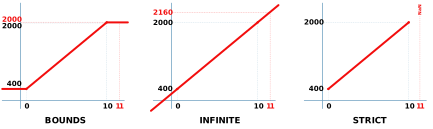
LinearType | enum, optional | What happens when value is outside the range in1 – in2. |
LinearType | Result outside the input range |
|---|---|
DEFAULT (or left out) | Same as BOUNDS. On cores older than 2022.2 it extrapolates like INFINITE. |
BOUNDS | The value is clamped to the range, so the result stays between out1 and out2. |
STRICT | NaN. |
INFINITE | The line continues (extrapolation). |
Returns — double. A NaN input gives NaN. When in1 equals in2 the slope cannot be computed and 1 is used instead.
Example — convert a raw value
# raw register 0 ... 1000 -> 0 ... 100 %
LINEAR(MODBUSR(H, 10, Uint16), 0, 0, 1000, 100);
VAR raw := 250;
LINEAR(raw, 0, 0, 500, 50);
# Result: 25
The effect of LinearType for input 11 with the points 0 → 400 and 10 → 2000:
LINEAR(11, 0, 400, 10, 2000, BOUNDS);
# Result: 2000
LINEAR(11, 0, 400, 10, 2000, INFINITE);
# Result: 2160
LINEAR(11, 0, 400, 10, 2000, STRICT);
# Result: NaN
Example — dimming: map a value to light brightness
A dimmer level in TapHome runs from 0 to 1 (0 – 100 %). This formula dims a light from full brightness in darkness to off at 300 lx of daylight; BOUNDS keeps the level between 0 and 1 for brighter or darker readings:
# Va is the daylight sensor in lx, the result is the dimmer level
LINEAR(Va, 0, 1, 300, 0, BOUNDS);
# Result: 0.5 at 150 lx, 0 at 300 lx and more
A dimming curve that never goes below 10 % — a slider value x from 0 to 1 is mapped to 0.1 – 1:
LINEAR(x, 0, 0.1, 1, 1);The same works for ventilation: LINEAR(co2, 400, 0, 1200, 1) gives 0 at 400 ppm, 0.5 (50 %) at 800 ppm and 1 at 1 200 ppm.
See also — HYSTERESIS, Rounding and random numbers.
HYSTERESIS
HYSTERESIS returns lowerState when a value falls to lowerThreshold, upperState when it rises to upperThreshold, and previousState while it stays between them.
| |
Hysteresis filters a signal so that the output reacts more slowly than the input: a thermostat switches a heater on when the temperature drops below one value, but off only when it rises above another.
Parameters
| Name | Type | Description |
|---|---|---|
value | number | Measured value, for example a temperature. |
upperThreshold | number | Value at or above which upperState is returned. Must be higher than lowerThreshold. |
lowerThreshold | number | Value at or below which lowerState is returned. |
upperState, lowerState | number | Results for the two thresholds — any numbers, not only 0 and 1. |
previousState | number | Result while the value is between the thresholds, usually the previous output. Must not be Null. |
Returns — double: upperState, lowerState or previousState. A value within 0.005 of a threshold counts as reaching it. A NaN value returns previousState.
Example — heating
Keep a room at 20 °C with a hysteresis of ±2 °C: the heater switches on when the temperature drops to 18 °C and off when it rises to 22 °C. In a Script smart rule the heater switch is both read and written:
# Te is the room temperature, Sw the heater switch
Sw := HYSTERESIS(Te, 22, 18, 0, 1, Sw);
In a Formula smart rule the previous result is LastState, which is Null on the first run and after a script error:
HYSTERESIS(Te, 22, 18, 0, 1, IF(ISNULL(LastState), 0, LastState));Errors
- Upper threshold must be higher than lower threshold — when you save a script whose thresholds are fixed numbers.
- Upper threshold (X) must be higher than lower threshold (Y) — at run time, when the thresholds come from variables.
See also — Scripts in smart rules, Hysteresis-based filling control of a tank.