
Syntax and control flow
Syntax of the TapHome script language: statements and semicolons, comments, literals, IF in function and block form, SWITCH, WHILE and DO loops, BREAK, CONTINUE and RETURN.
Statements and semicolons
A script is a sequence of statements, and every statement ends with a semicolon ;. Block statements (IF … END, WHILE … LOOP, DO … LOOP WHILE …) and comments do not end with a semicolon. Keywords and names are case insensitive: IF, if and If are the same.
VAR x := 5;
IF x > 3
    x := x - 1;
END
x;
# Result: 4
The semicolon may be left out only after the last statement of the script; inside a block every statement needs it, including the last one before END or LOOP. Inside a block a missing semicolon before END or LOOP stops the script with Unexpected character 'E' at the end of statement. Expected ';' ('L' before LOOP).
Comments
A comment starts with # and runs to the end of the line. It can stand on its own line, or follow a complete statement: after its semicolon, or after END, ELSE or LOOP.
# starting value
VAR x := 5;          # a comment after the semicolon
IF x > 3
    x := 1;
END                  # end of the check
A # inside a statement (before its semicolon, or after an IF or WHILE condition) fails with Comment must start on a new line and inline comments are not supported.
Literals
A literal is a value written directly in the script.
| Literal | Example | Notes |
|---|---|---|
| Number | 5, 21.5, -3 | Decimal point .. A number literal is a double, so 5 / 2 is 2.5. No exponent (1e3), no leading dot (.5). |
| Hexadecimal | 0xA0A0, 0xff | An int, digits not case sensitive: 0xA0A0 is 41120. |
| Binary | 0b10101010 | An int: 170. |
| Boolean | TRUE, FALSE | |
| Unknown number | NaN | Never equal to anything; test it with ISNAN. |
| No value | Null | Test it with ISNULL. |
| String | "°C", "a\nb", "C:\\data" | Escapes \n, \r, \t, \", \\, \xHH, \uXXXX. An invalid escape fails with Couldn't unescape …. |
| Char | 'A', '\n' | Exactly one character. |
| Collection | {1, 2, 3}, {"a", "b"} | At least one element, see Collections. |
| Enum value | H, BigEndianFloat, DateTimeKind.Utc | Bare or with the type name, see Enum types. |
IF
IF returns one of two values depending on a condition (function form), or runs one of several blocks of statements (block form).
| |
Parameters
| Name | Type | Description |
|---|---|---|
condition | bool | A non-zero number is TRUE, Null is FALSE. |
valueIfTrue | any | Returned when the condition is TRUE. |
valueIfFalse | any | Optional, returned otherwise. |
Returns the selected value, or Null when the condition is not TRUE and there is no third argument. Only the selected branch is evaluated, so the other one cannot fail.
Example — safe division and a replacement for NaN. Dividing by zero stops the script with Line in script: 1 Message: Division by zero; the condition prevents it:
IF(va2 > 0, va1/va2, 0);
# Result: va1/va2, or 0 when va2 is 0
IF(ISNAN(Te), 0, Te);
# Result: 0 when the device is in error or returns NaN
Block form
| |
The condition may be in parentheses and must fit on one line; the line break ends it. ELSEIF can repeat, ELSE is optional, END is mandatory. The block itself returns Null; use RETURN to produce a value from inside it.
IF Te < 5
    RETURN(1);
ELSEIF Te > 10
    RETURN(3);
ELSE
    RETURN(0);
END
Errors — Function IF requires at least 2 parameters.; Unexpected keyword 'X' at the end of IF statement. when a ; follows an inner END.
SWITCH
SWITCH compares a value with a list of cases and returns the result of the first matching case, or a default result when no case matches.
| |
Remarks — SWITCH takes at least 4 and at most 100 arguments, always an even number: the value, pairs of a case and its result, and the default result. Cases are compared like =: numbers by value, text exactly; comparing text with a number fails with Operator '==' not defined …. Only the result of the matching case is evaluated.
Example — the device manual lists the active mode as bit values; the script turns them into multi-value switch positions:
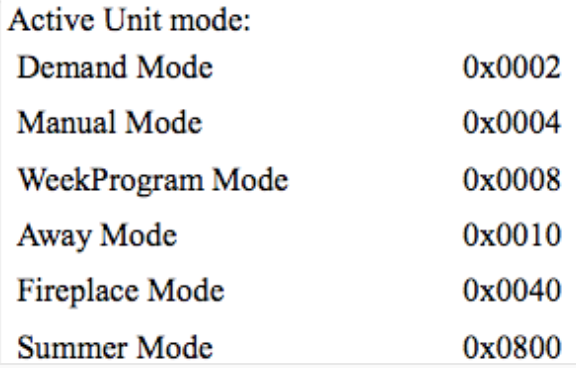
SWITCH(MODBUSR(H, 168, UInt16),
    0, 0,
    0x0002, 1,
    0x0004, 2,
    0x0008, 3,
    0x0010, 4,
    0x0040, 5,
    0x0800, 6,
    NaN);
Errors — Function SWITCH requires at least 4 parameters.; Invalid arguments for SWITCH function. for an odd number of arguments.
WHILE and DO loops
WHILE repeats its statements while the condition is TRUE; DO … LOOP WHILE runs them at least once. CONTINUE; skips the rest of the pass, BREAK; leaves the loop; both are written without parentheses.
| |
As with IF, the condition ends at the line break. When it starts with (, it ends at the matching ): WHILE (a > 0) AND (b > 0) takes only (a > 0) as the condition, so write WHILE (a > 0 AND b > 0).
int i := 10;
WHILE i > 0
    i := i - 1;
    IF i > 5
        CONTINUE;
    END
    BREAK;
LOOP
i;
# Result: 5
int n := 1;
DO
n := n * 2;
LOOP WHILE n < 100
n;
# Result: 128Errors — a loop stops with More than 1 000 000 loops, stopping loop. BREAK or CONTINUE outside a loop fails with Cannot use BREAK() outside of WHILE or DO-WHILE. A ; after an inner LOOP or END fails with Unexpected character ';' in WHILE statement.
Names are resolved before the loop keywords. A variable or a device abbreviation called
DoorWhilehides the keyword, and the loop fails withMissing operator between 'DO' and ….
RETURN
RETURN ends the script immediately and makes the given value its result.
| |
Remarks — without RETURN the result is the value of the last statement. Use RETURN to give a value from inside a block, or to stop a listener script early for messages it does not handle.
IF ISNAN(Te)
    RETURN(0);
END
Te * 1.8 + 32;
# Result: the temperature in °F, or 0 when it is unknown
See also — Script result.