
Version 2025.1
What's new in TapHome 2025.1: Schemas, Day and Night Mode in Schemas, Minor Updates.
Last updated:
TapHome 2025.1 brings Schemas, a new dashboard section for visualizing complex installations with customizable layouts, and separate day and night images within Schemas. Schemas accept raster (.jpeg, .png, .webp) and vector (.svg) images, show details of devices and values on click, and can be edited only in the Windows application, while iOS and Android offer view-only access. They require control unit software version 2025.1 or higher. The release also prepares for the upcoming Single-zone Controller and Thermostatic Controller.
Schemas
A new dashboard section that enables visualization of complex installations using customizable layouts:
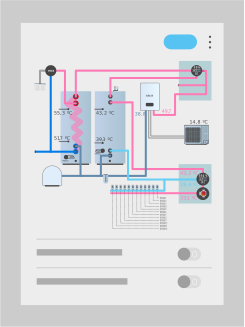
Features:
- Image support: Accepts raster formats (.jpeg, .png, .webp) and vector (.svg) files; images exceeding 3200px are automatically resized
- Objects: Supports Text elements (single-line/multi-line), Device, and Value
- Interaction: Clicking on devices/values displays detailed information
- Editing: Windows application only; iOS/Android platforms offer view-only access
- Requirements: Control unit software version 2025.1 or higher
- Storage: Approximately 50MB available for media files in Core 2
- Color modes: Three schemes available—light, dark, and automatic (adapts to app settings)
- Accessibility: Keyboard shortcuts supported; schemas automatically zoom to occupy at least 3/4 of screen height on mobile devices
Use cases: Boiler room visualization, floor plans, service documentation, sensor/actuator placement on technical room photos.
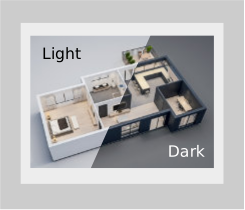
Day and Night Mode in Schemas
Separate image definitions for day and night mode with automatic color adjustment based on control settings.
Minor Updates
Preparation for upcoming devices: Single-zone Controller and Thermostatic Controller
See also — Version 2024.2, Version 2025.2.